MATH 1051 - Lecture 05

Working with Variables and Visualization in R

Kat Clark & Wesley Burr

Trent University

Today

  • Exploratory data analysis (EDA)
    • summary statistics
    • plotting (histograms and boxplots)
    • outliers, skew, and modality (oh my!)
  • Scatterplots & Correlation
  • Lines of best fit

Readings

Chapter 7 of Introduction to Modern Statistics (2e).

(we will revisit this on Wednesday, and in Lab as well)

Data

To work with data in R, it must be organized in some fashion. The two objects we will use the most to do this are:

  • The Vector: a comma-separated list of elements
  • The Data Frame: a bunch of vectors, organized as columns in a spreadsheet-like object

We will demo the data.frame today, and it was the topic of Lab 3.

Example 1: Simulated Data

Our first example will use simulated data to explore the ideas. We will generate 100 randomly selected integers between 1 and 1000. This is done using the sample() function.

library(dplyr)
1dat1 <- data.frame(
2            values=sample(x = seq(from = 1, to = 1000, by = 1),
3                          size = 100,
4                          replace = TRUE))
5dat1 |> glimpse()
1
Create a data frame to store our sample and store the sample as a variable values.
2
Specify the vector we will sample from; all integer values from 1 to 1000;
3
Indicate many values from the vector we want to sample;
4
Sample with replacement (TRUE) or without replacement (FALSE);
5
Glimpse the structure of dat1:
Rows: 100
Columns: 1
$ values <dbl> 931, 812, 197, 212, 775, 477, 824, 63, 412, 600, 871, 648, 960,…

Example 1: Summary Statistics

Now that we have the data, let’s summarize it.

dat1 |> summary()
     values     
 Min.   : 15.0  
 1st Qu.:332.5  
 Median :587.5  
 Mean   :532.9  
 3rd Qu.:765.2  
 Max.   :997.0  


From this summary we see that the sample of 100 observations ranges from Min. : 15.0 to Max. :997.0 , with Median :587.5 (there are an even number of observations) and Mean :532.9

Example 1: Summary Functions

We can also apply individual summary functions to the values variable

1library(dplyr)
2dat1 |> summarize(sd = sd(values),
                  IQR = IQR(values),
3                  custom_stat = mean(sqrt(values)))
1
The |> command is called piping. This feature (and the summarize function) come from the dplyr package. We load it with library(dplyr).
2
sd() and IQR() are base R functions.
3
We can also use the summarize() function to calculate a custom statistic of interest.
        sd    IQR custom_stat
1 286.8922 432.75    21.89773

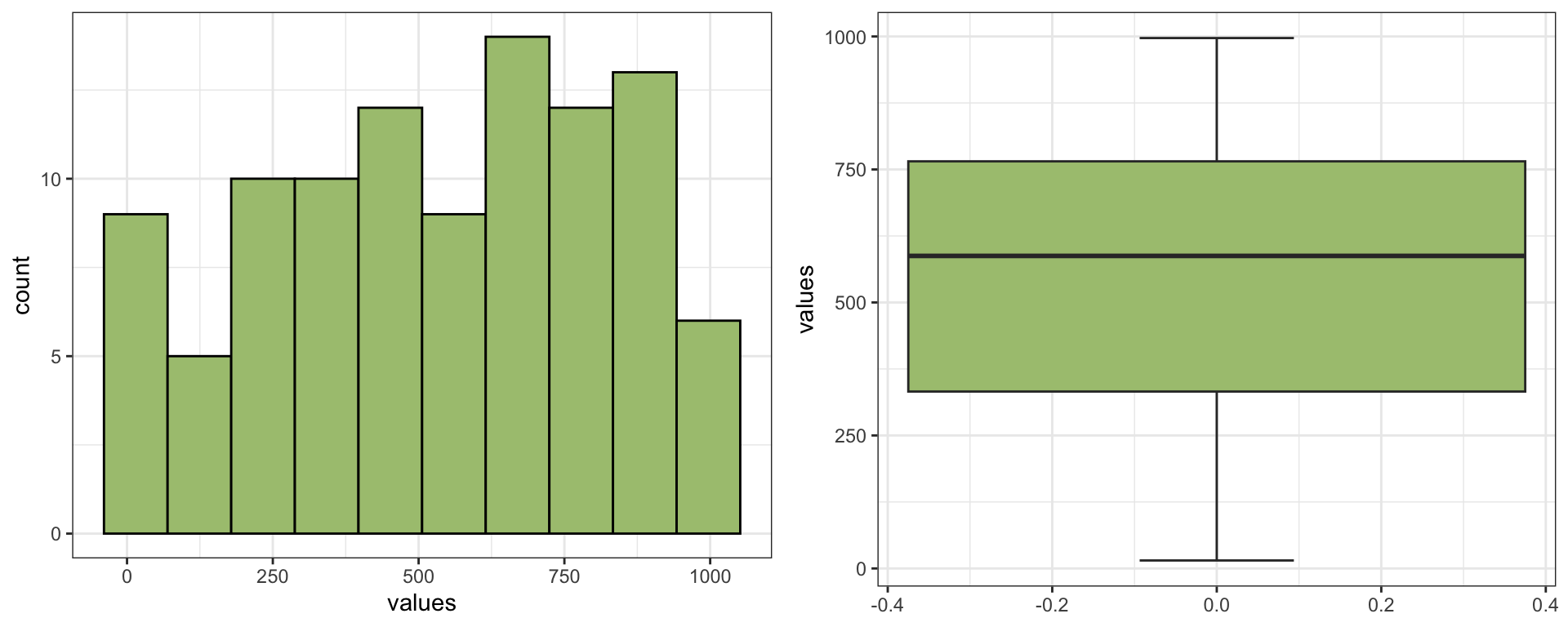
Example 1: Summary Plots

library(ggplot2)
ggplot(data = dat1,mapping = aes(x=values))+
  geom_histogram(bins = 10, fill = "yellowgreen", col = "black") + 
  theme_bw()
ggplot(data = dat1, mapping = aes(y = values)) + 
  geom_boxplot(staplewidth = 0.25, fill = "yellowgreen") + 
  theme_bw()

Example 1: What Can We Say?

From the two plots and the summary statistics, we might say:

  • the data are either uniform or unimodal
  • there is a very slight left skew, but not a strong one
  • there are no obvious outliers
  • 50% of the data are between 1st Qu.:332.5 and 3rd Qu.:765.2 (the IQR)

Example 2: Global Population

The World Health Organization Global Tuberculosis Report contains information on the cases of tuberculosis worldwide. It also include countries’ names and their populations, which is what we will look at.

1library(tidyr)
2data(population)
population |> glimpse()
1
Loading the tidyr library which contains these datasets;
2
Make the data available in our environment;
Rows: 4,060
Columns: 3
$ country    <chr> "Afghanistan", "Afghanistan", "Afghanistan", "Afghanistan",…
$ year       <dbl> 1995, 1996, 1997, 1998, 1999, 2000, 2001, 2002, 2003, 2004,…
$ population <dbl> 17586073, 18415307, 19021226, 19496836, 19987071, 20595360,…

Example 2:Filtering

  • We can see from our glimpse() that Afghanistan shows up multiple times (once per year).
  • Let’s look at only data from 2013.
filtered_pop <- population |> filter(year == 2013)
filtered_pop |> glimpse()
Rows: 217
Columns: 3
$ country    <chr> "Afghanistan", "Albania", "Algeria", "American Samoa", "And…
$ year       <dbl> 2013, 2013, 2013, 2013, 2013, 2013, 2013, 2013, 2013, 2013,…
$ population <dbl> 30551674, 3173271, 39208194, 55165, 79218, 21471618, 14300,…

Example 2: Global Population

  • The population data.frame for 2013 consists of 217 observations (rows) of the country, year, and population variables (columns);
filtered_pop |> nrow()
[1] 217
filtered_pop |> ncol()
[1] 3
filtered_pop |> names()
[1] "country"    "year"       "population"

Example 2: Summary Statistics

filtered_pop |> summary()
   country               year        population       
 Length:217         Min.   :2013   Min.   :1.195e+03  
 Class :character   1st Qu.:2013   1st Qu.:7.349e+05  
 Mode  :character   Median :2013   Median :6.092e+06  
                    Mean   :2013   Mean   :3.288e+07  
                    3rd Qu.:2013   3rd Qu.:2.170e+07  
                    Max.   :2013   Max.   :1.386e+09  

Because population has three variables, a summary is computed for each. If we only care about population, we can select that variable specifically.

filtered_pop |> select(population) |> summary()
   population       
 Min.   :1.195e+03  
 1st Qu.:7.349e+05  
 Median :6.092e+06  
 Mean   :3.288e+07  
 3rd Qu.:2.170e+07  
 Max.   :1.386e+09  

Example 2: Summary Statistics

filtered_pop |> pull(population) |> summary()
     Min.   1st Qu.    Median      Mean   3rd Qu.      Max. 
1.195e+03 7.349e+05 6.092e+06 3.288e+07 2.170e+07 1.386e+09 
  • In this summary, things are presented in scientific notation:
    • any big number (or small number) in R will be presented this way;
  • We see that the 217 observations range from 1.195e+03 (1,195) to 1.386e+09 (1,386,000,000).
  • Do you know which countries these might be?

The mean is clearly much greater than the median here (almost 10x larger).

Warning

Scientific notation in WeBWork uses ‘E’, so 1.129e+03 should be entered as 1.129E03 if you are answering a WeBWorK question.

Example 2: Summary Plots

ggplot(data = filtered_pop, mapping = aes(x = population)) +
  geom_histogram(bins = 40, fill = "yellowgreen", col = "black") +
  theme_bw()

Example 2: Summary Plots

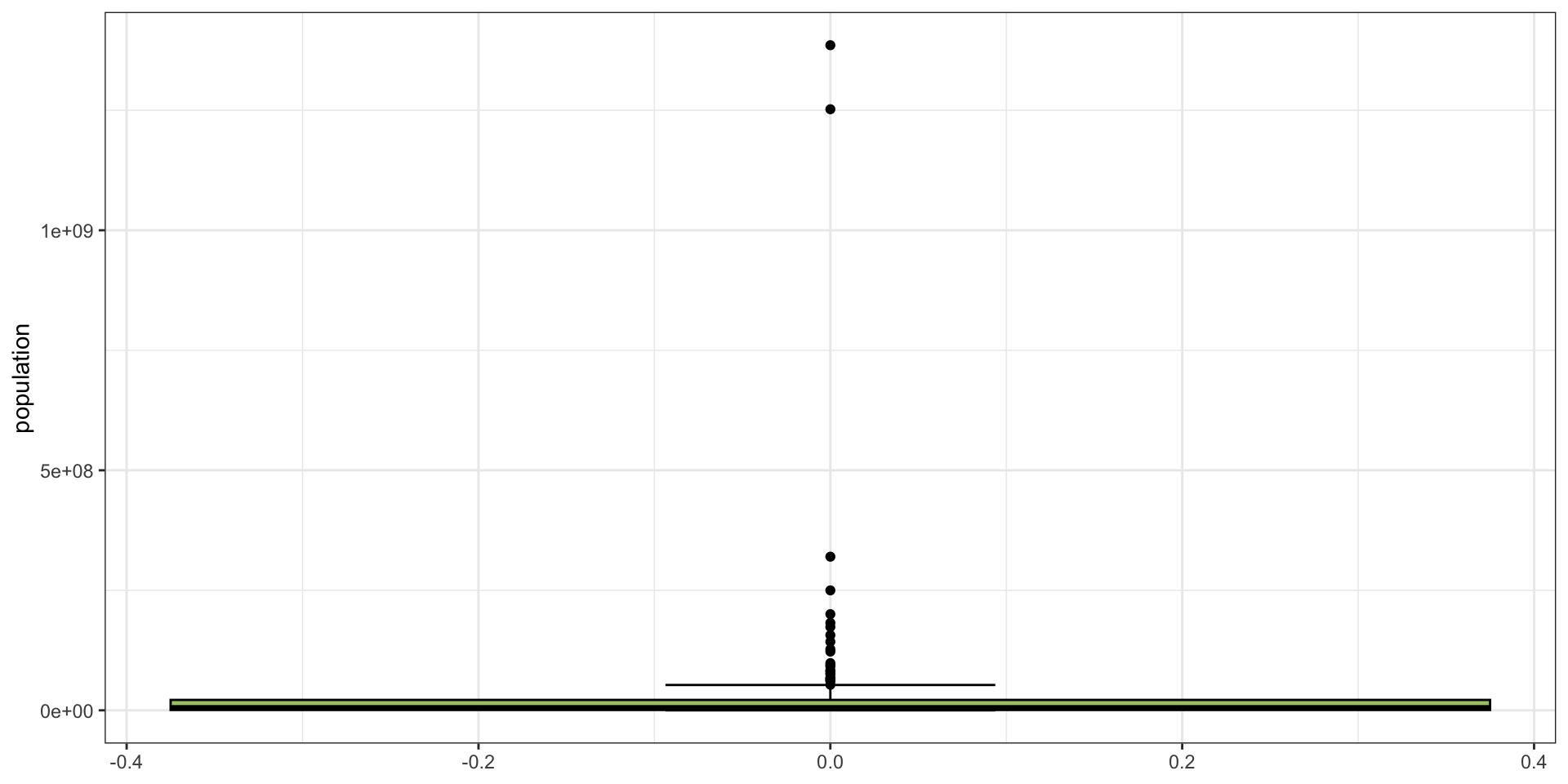
ggplot(data = filtered_pop, mapping = aes(y = population)) + 
  geom_boxplot(fill = "yellowgreen", col = "black", staplewidth = 0.25) +
  theme_bw()

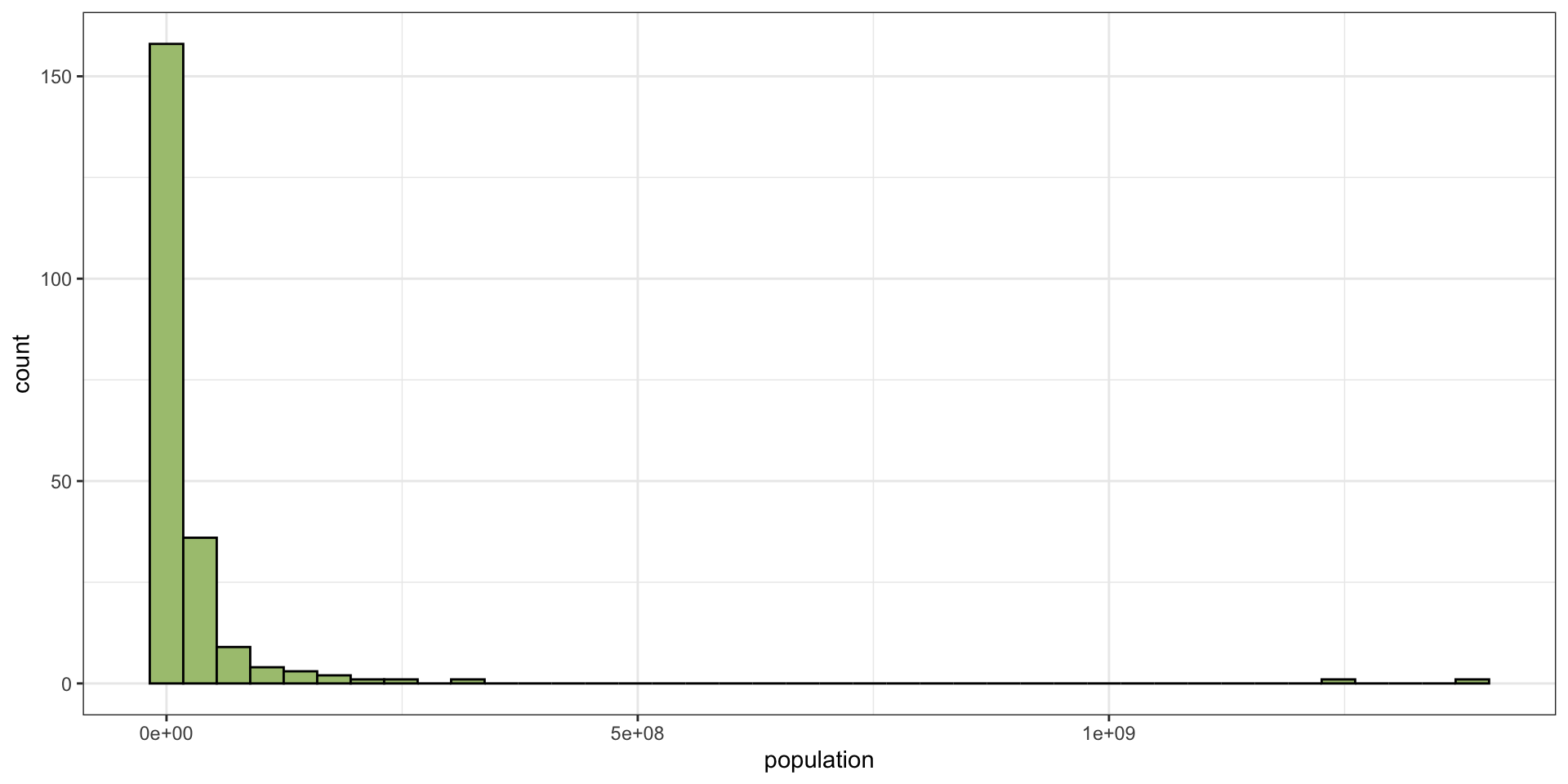
Example 2: What Can We Say?

From the two plots and the summary statistics, we might say:

  • the data has a strong right skew
  • there are obvious outliers
  • 25% of the data are less than 734,917
  • 50% of the data are between 734,917 and 21,698,585
  • 25% of the data are greater than 21,698,585

(to get those numbers, we’d have to extract them - the plot is too hard to read)

Example 2: What’s Happening?

There’s too big a range in the data!

  • 25% of the data are above 21.7 million;
  • meaning 75% are below 21.7 million;
  • but above 21.7 million are many of the countries you know of
    • e.g., Canada, USA, Australia, Brazil, Russia, China, India, Germany, France, the UK, etc…

So these data are very odd … let’s take a closer look.

Example 2: Advanced (Bottom 75%)

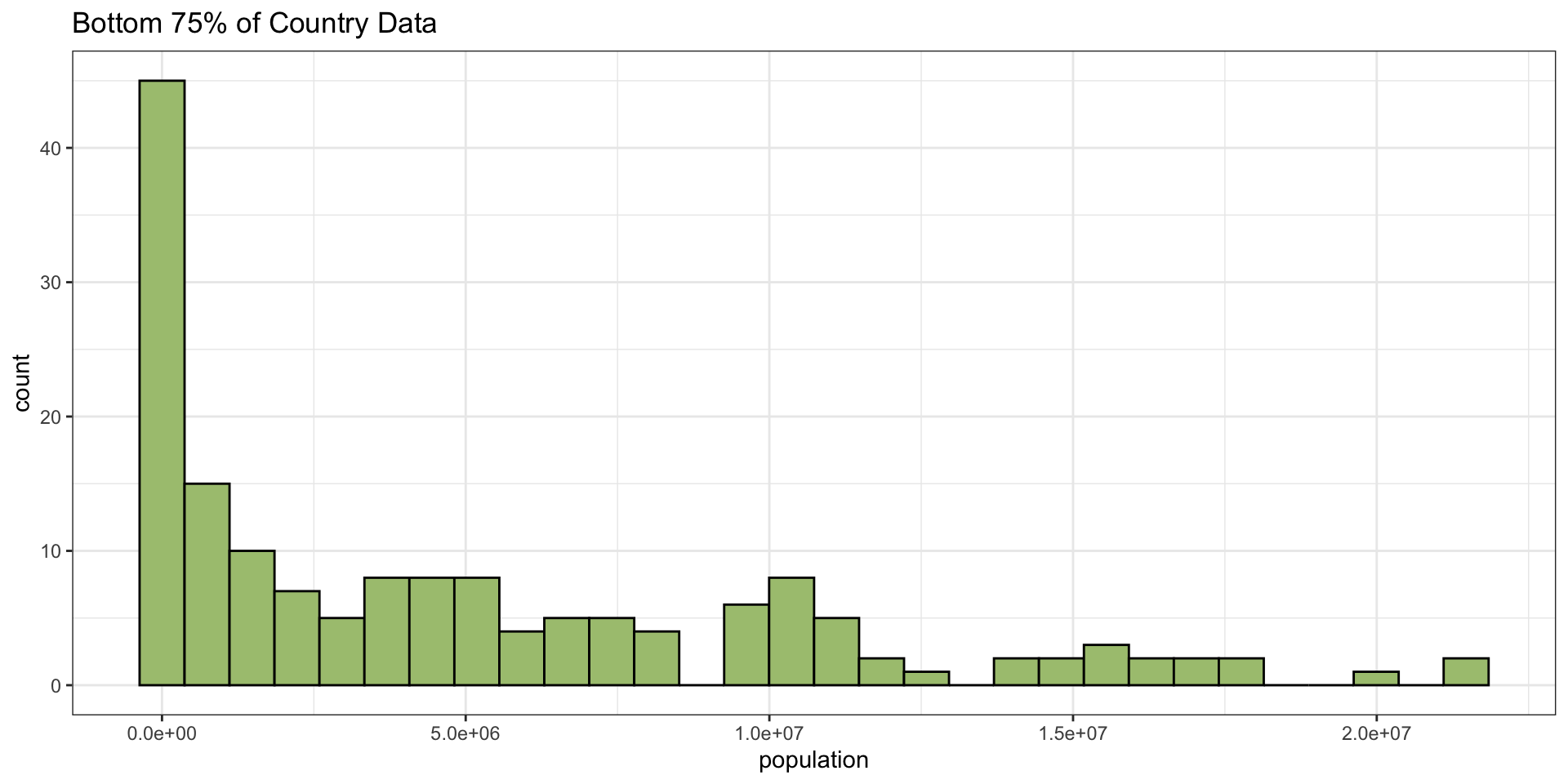
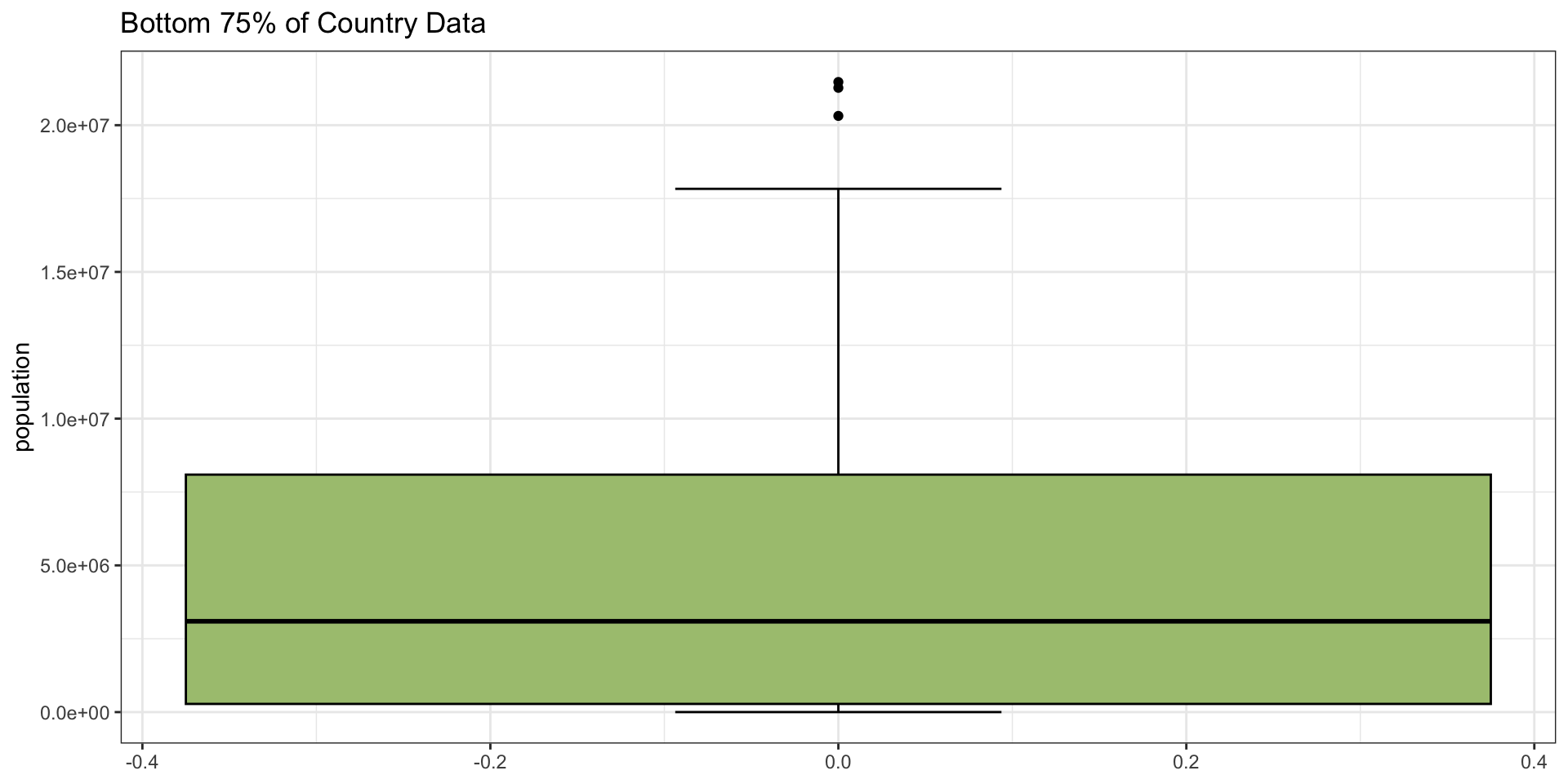
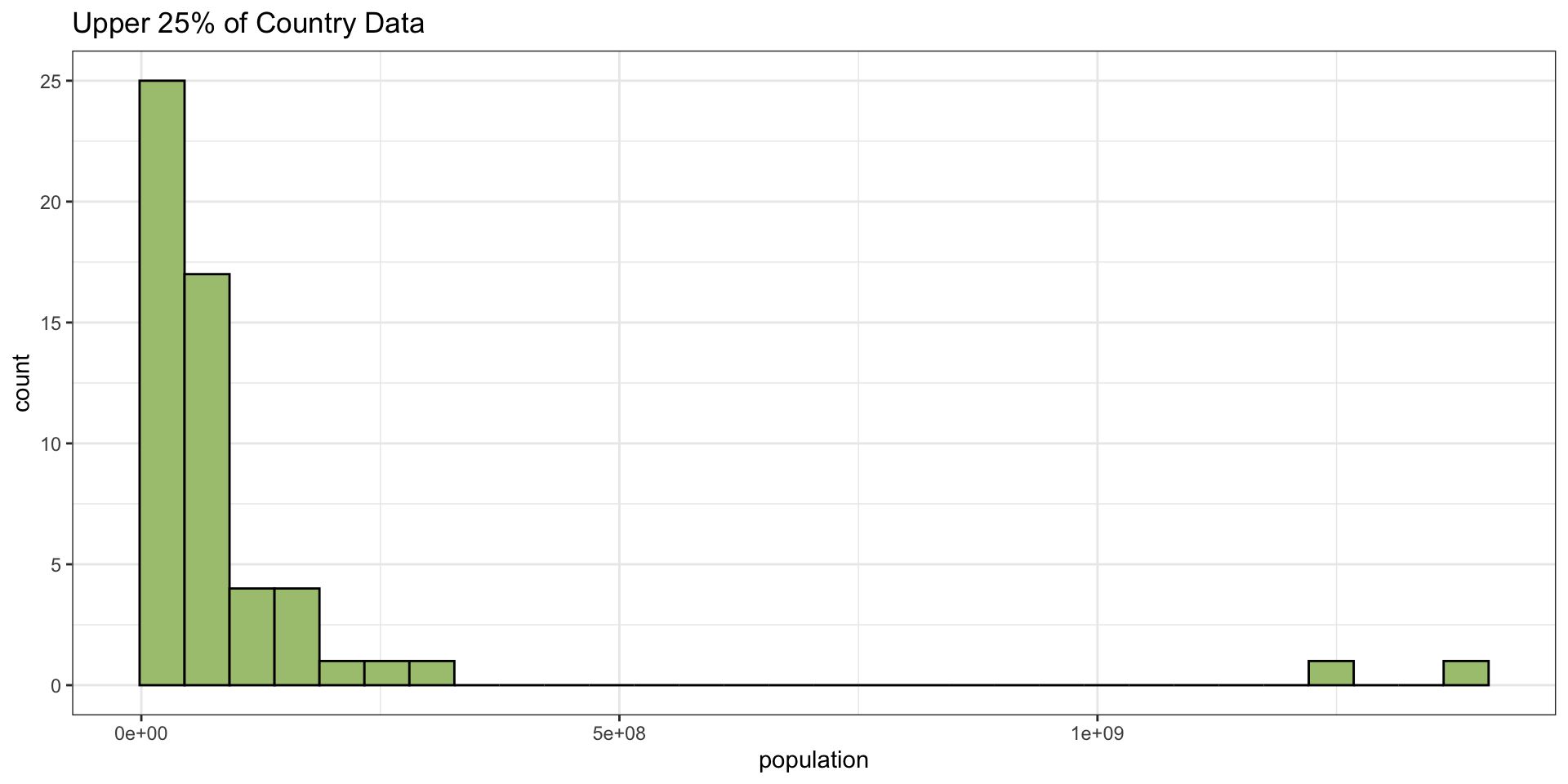
I don’t expect you to follow the code, so I’ve hidden it here. What we’re going to do is look at only the observations that are less than 21.7 million (the bottom 75%) alone, and then the upper 25%.

Example 2: Advanced (Bottom 75%)

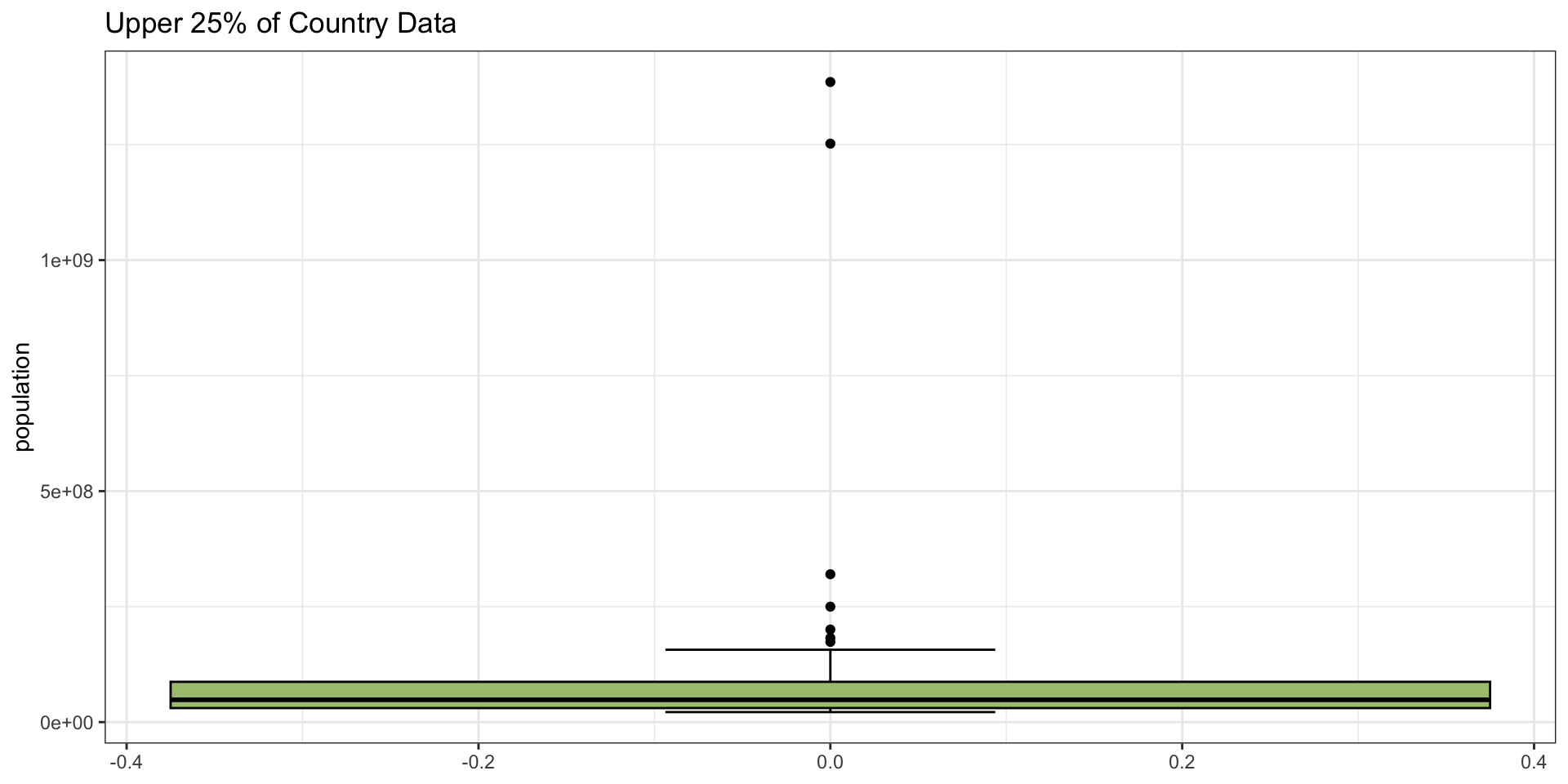
Example 2: Advanced (Top 25%)

What does this show? We still have a huge number of really small observations, easily 1/4 of the entire data set, and then a very long right tail. What about the upper 25%?

Example 2: Advanced (Top 25%)

The histogram shows that after the bottom 75%, we have very few cases in each category - the bins of the two plots are the same width, but things are far more spaced out on the upper end.

Example 2: What Can We Say?

From our expanded analysis:

  • the data has a strong right skew, with lots of outliers
  • 25% of the data are greater than 21,698,585, but are very spread out
  • even the 75% of the data that are less than 21,698,585 are very strongly right-skewed

Example 3: Traffic Fatalities

There is an Applied Econometrics package in R which contains some interesting data. One of the sets is traffic fatalities for the “lower 48” United States states for the 7 years from 1982 to 1988 (\(48 \times 7 = 336\)).

library("AER")
data("Fatalities")
Fatalities |> glimpse()
Rows: 336
Columns: 34
$ state        <fct> al, al, al, al, al, al, al, az, az, az, az, az, az, az, a…
$ year         <fct> 1982, 1983, 1984, 1985, 1986, 1987, 1988, 1982, 1983, 198…
$ spirits      <dbl> 1.37, 1.36, 1.32, 1.28, 1.23, 1.18, 1.17, 1.97, 1.90, 2.1…
$ unemp        <dbl> 14.4, 13.7, 11.1, 8.9, 9.8, 7.8, 7.2, 9.9, 9.1, 5.0, 6.5,…
$ income       <dbl> 10544.15, 10732.80, 11108.79, 11332.63, 11661.51, 11944.0…
$ emppop       <dbl> 50.69204, 52.14703, 54.16809, 55.27114, 56.51450, 57.5098…
$ beertax      <dbl> 1.53937948, 1.78899074, 1.71428561, 1.65254235, 1.6099070…
$ baptist      <dbl> 30.3557, 30.3336, 30.3115, 30.2895, 30.2674, 30.2453, 30.…
$ mormon       <dbl> 0.32829, 0.34341, 0.35924, 0.37579, 0.39311, 0.41123, 0.4…
$ drinkage     <dbl> 19.00, 19.00, 19.00, 19.67, 21.00, 21.00, 21.00, 19.00, 1…
$ dry          <dbl> 25.0063, 22.9942, 24.0426, 23.6339, 23.4647, 23.7924, 23.…
$ youngdrivers <dbl> 0.211572, 0.210768, 0.211484, 0.211140, 0.213400, 0.21552…
$ miles        <dbl> 7233.887, 7836.348, 8262.990, 8726.917, 8952.854, 9166.30…
$ breath       <fct> no, no, no, no, no, no, no, no, no, no, no, no, no, no, n…
$ jail         <fct> no, no, no, no, no, no, no, yes, yes, yes, yes, yes, yes,…
$ service      <fct> no, no, no, no, no, no, no, yes, yes, yes, yes, yes, yes,…
$ fatal        <int> 839, 930, 932, 882, 1081, 1110, 1023, 724, 675, 869, 893,…
$ nfatal       <int> 146, 154, 165, 146, 172, 181, 139, 131, 112, 149, 150, 17…
$ sfatal       <int> 99, 98, 94, 98, 119, 114, 89, 76, 60, 81, 75, 85, 87, 67,…
$ fatal1517    <int> 53, 71, 49, 66, 82, 94, 66, 40, 40, 51, 48, 72, 50, 54, 3…
$ nfatal1517   <int> 9, 8, 7, 9, 10, 11, 8, 7, 7, 8, 11, 19, 16, 14, 5, 2, 2, …
$ fatal1820    <int> 99, 108, 103, 100, 120, 127, 105, 81, 83, 118, 100, 104, …
$ nfatal1820   <int> 34, 26, 25, 23, 23, 31, 24, 16, 19, 34, 26, 30, 25, 14, 2…
$ fatal2124    <int> 120, 124, 118, 114, 119, 138, 123, 96, 80, 123, 121, 130,…
$ nfatal2124   <int> 32, 35, 34, 45, 29, 30, 25, 36, 17, 33, 30, 25, 34, 31, 1…
$ afatal       <dbl> 309.438, 341.834, 304.872, 276.742, 360.716, 368.421, 298…
$ pop          <dbl> 3942002, 3960008, 3988992, 4021008, 4049994, 4082999, 410…
$ pop1517      <dbl> 208999.6, 202000.1, 197000.0, 194999.7, 203999.9, 204999.…
$ pop1820      <dbl> 221553.4, 219125.5, 216724.1, 214349.0, 212000.0, 208998.…
$ pop2124      <dbl> 290000.1, 290000.2, 288000.2, 284000.3, 263000.3, 258999.…
$ milestot     <dbl> 28516, 31032, 32961, 35091, 36259, 37426, 39684, 19729, 1…
$ unempus      <dbl> 9.7, 9.6, 7.5, 7.2, 7.0, 6.2, 5.5, 9.7, 9.6, 7.5, 7.2, 7.…
$ emppopus     <dbl> 57.8, 57.9, 59.5, 60.1, 60.7, 61.5, 62.3, 57.8, 57.9, 59.…
$ gsp          <dbl> -0.022124760, 0.046558253, 0.062797837, 0.027489973, 0.03…
Example 3: Summary Statistics

Fatalities |> select(fatal) |> summary()
     fatal       
 Min.   :  79.0  
 1st Qu.: 293.8  
 Median : 701.0  
 Mean   : 928.7  
 3rd Qu.:1063.5  
 Max.   :5504.0  


  • In this summary, the mean is clearly much greater than the median, so we expect a right skew;
  • The range is quite large as well:
    • a minimum of 79 fatalities in a given year and state, and
    • a maximum of 5504 fatalities in another state (not necessarily the same year).

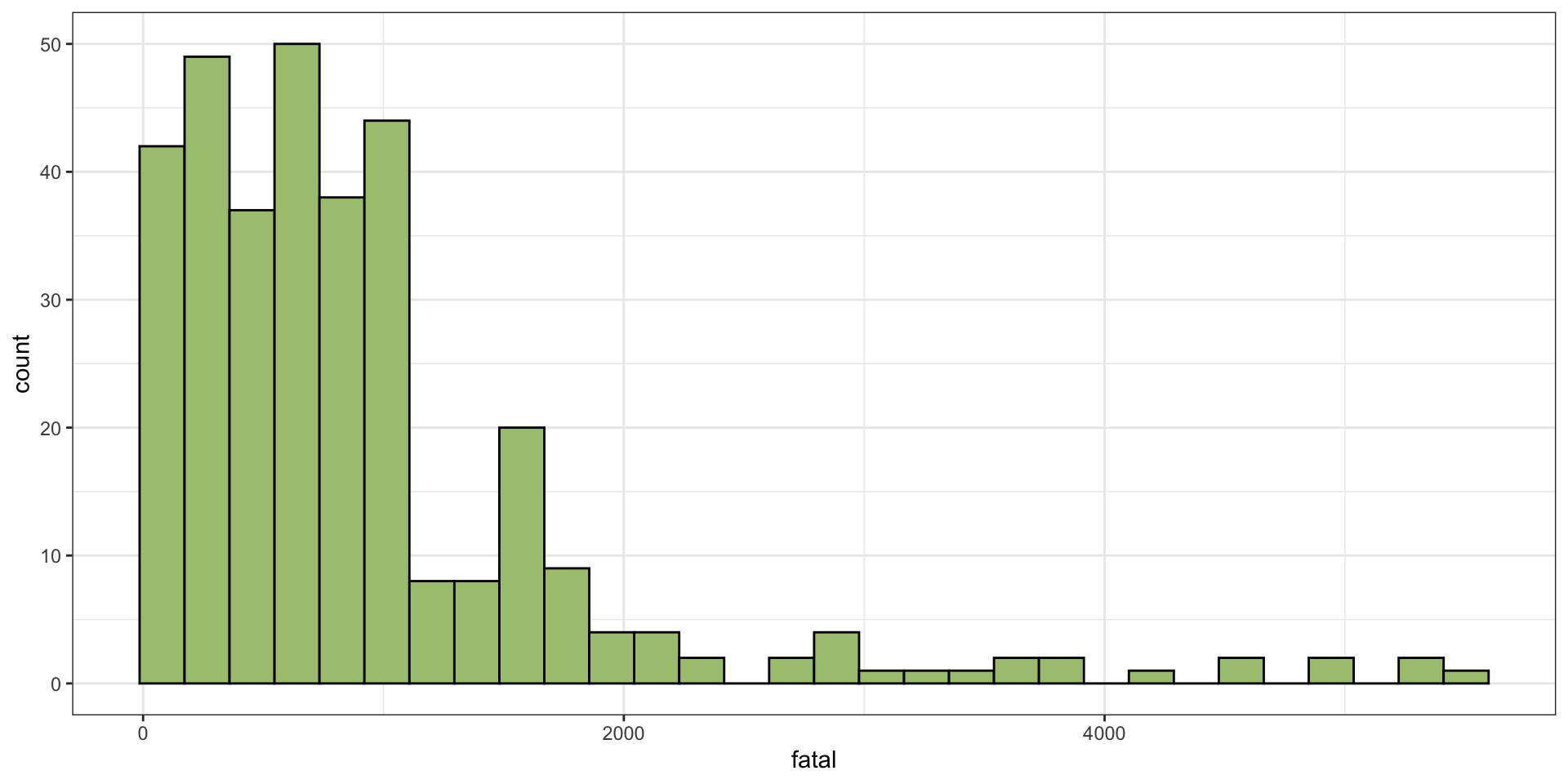
Example 3: Summary Plots

ggplot(data = Fatalities, mapping = aes(x = fatal)) +
  geom_histogram(fill = "yellowgreen", col = "black") +
  theme_bw()

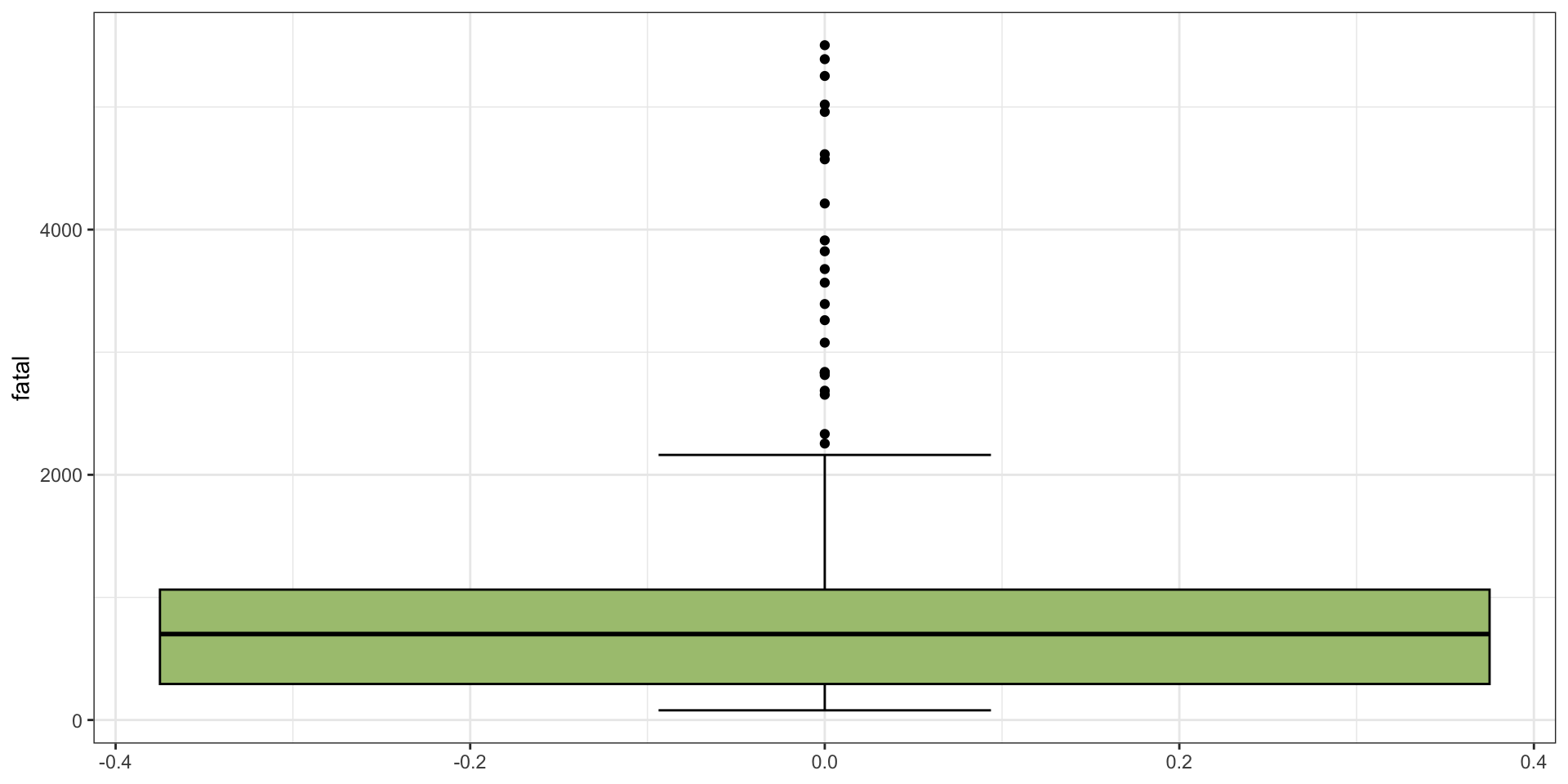
Example 3: Summary Plots

ggplot(data = Fatalities, mapping = aes(y = fatal)) +
  geom_boxplot(staplewidth = 0.25, fill = "yellowgreen", col = "black") +
  theme_bw()

Example 3: What Can We Say?

  • left truncated - definitely not symmetric
  • clear right skew
  • many outliers (above about 2500)
  • unimodal

Example 3: Comparing IQR and SD

Fatalities |> 
  summarize(sd = sd(fatal), IQR = IQR(fatal))
        sd    IQR
1 934.0515 769.75


  • Notice how the IQR is quite a bit smaller than the standard deviation?
  • This is the robustness discussion from earlier.
    • i.e., the IQR is not as affected by outliers as the standard deviation.

What is the point of EDA?

When you get a data set that you’ve never seen it before, you need to perform some exploratory analysis on it.
The demonstrations today should give you a hint as to how to start doing that.
There are many possible visualizations, especially when there are multiple variables, but for single variables, the key things to check are:

  • summary statistics: mean, median, quantiles, IQR, sd
  • the histogram (possibly experiment with multiple breakpoints)
  • the boxplot (to see outliers and skew)

Class Survey 📊

On Wednesday, we’ll investigate: Does coffee consumption relate to sleep?

☕ Coffee Consumption (per day): Enter the total amount of coffee you typically drink in millilitres (mL).

Examples: Small coffee ≈ 250 mL; Medium coffee ≈ 350 mL; Large coffee ≈ 500 mL;

😴 Sleep Duration (per night): Enter your average sleep time in minutes.

Examples: 7 hours = 420 minutes; 7 h 15 min = 435 minutes; 8 h 10 min = 490 minutes;

Tips

  • Give your best estimate, not just a rounded value.
  • It’s perfectly fine if your answers look unusual (e.g., 435 minutes, 320 mL).

Linear Relationships

Data and Modelling

In science, we often obtain data from experiments or observational studies, and then are interested in modelling it. How we model it varies from field to field, but underlying many of the models used in science are statistical models. In this lecture, we will be examining one of the foundational models used all through every scientific field.

The material for this lecture comes from Chapter 7.

Modelling numerical variables

We will begin by quantifying the straight-line relationship between two numerical variables. The model is therefore “find the (linear) relationship between two variables”.

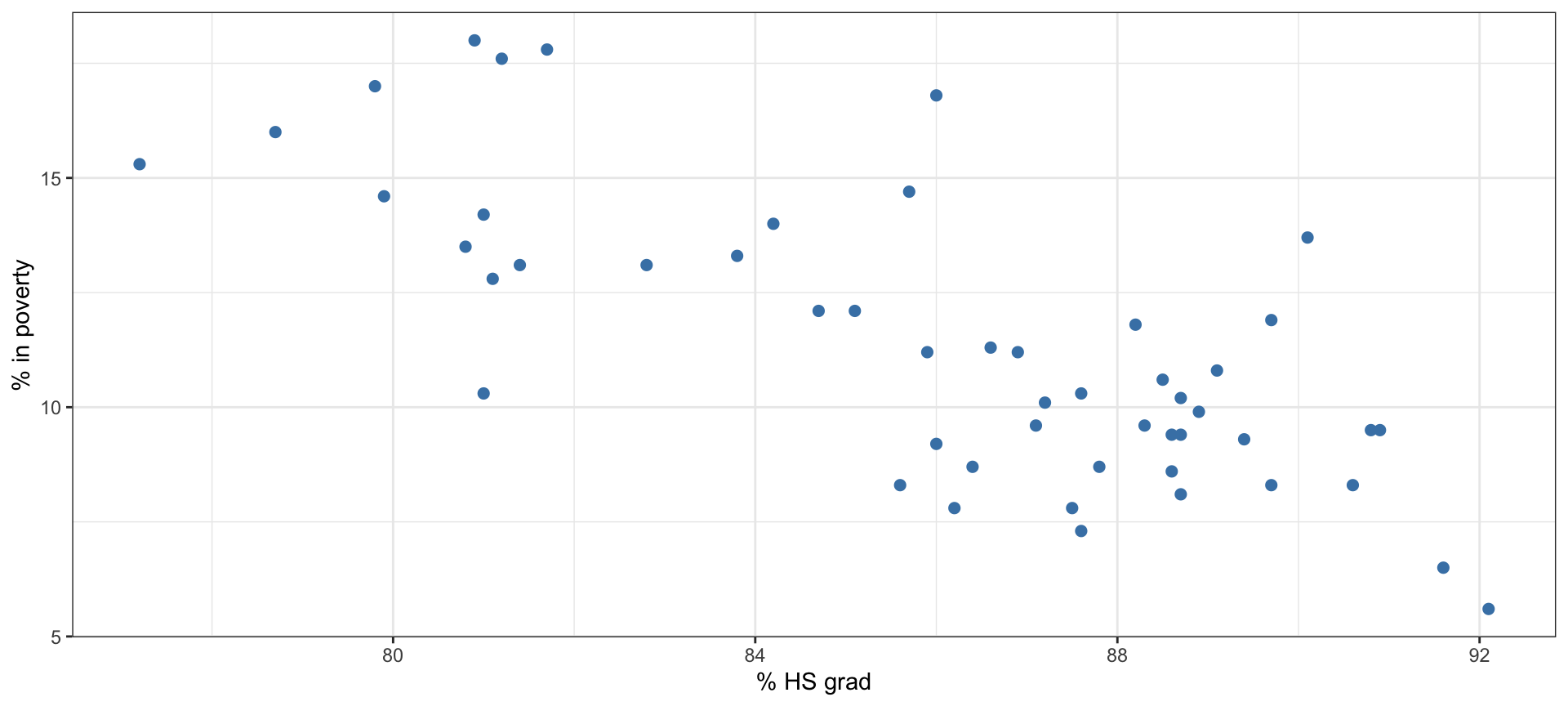
Poverty vs. HS graduate rate

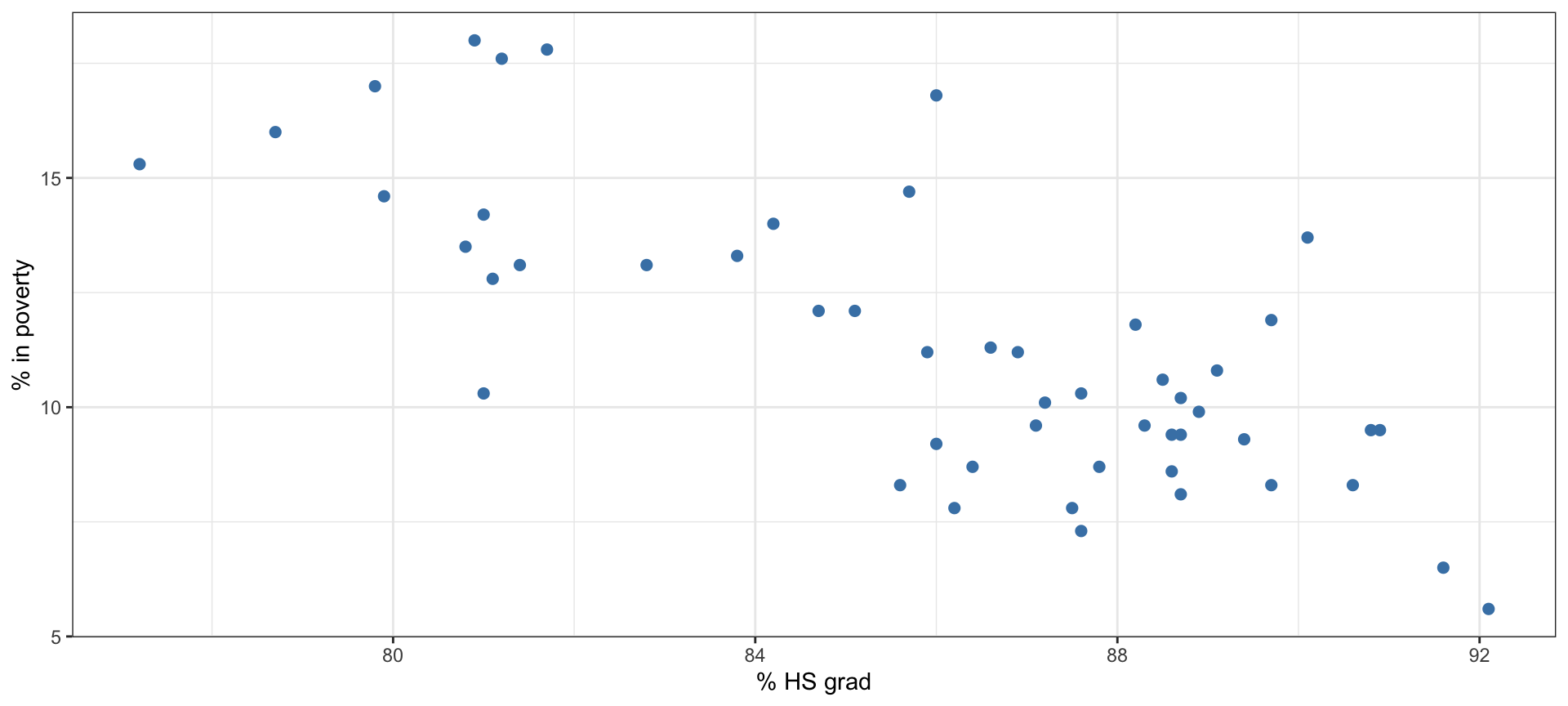
This scatterplot shows the relationship between the % of residents who live below the poverty line (income below $23,050 for a family of 4 in 2012) and the HS graduate rate in all 50 US states and DC.

Poverty vs. HS graduate rate (code)

library(ggplot2)
ggplot(poverty, aes(x = Graduates,y = Poverty))+
  geom_point(col="steelblue",cex=2)+theme_bw()+
  ylab("% in poverty")+xlab("% HS grad")

Poverty vs. HS graduate rate 📊

  • Response variable?
  • Explanatory variable?
  • Relationship?

Poverty vs. HS graduate rate

  • Response variable? % in poverty
  • Explanatory variable? % HS grad
  • Relationship? linear, negative, moderately strong

This description of the relationship is qualitative, that is, we have used the graph and made some observations.
However, that means that not everyone will come to the same conclusions.

Quantifying the relationship

  • Correlation describes the strength of the linear association between two variables.
  • It takes values between -1 (perfect negative) and +1 (perfect positive).
  • A value of 0 indicates no linear association.

Warning

Just because two variables are not linearly associated does not mean that they have no relationship!

The variables could be quadratically related, or periodically related and still have a correlation of 0.

Guessing the correlation 📊

Which of the following is the best guess for the correlation between % in poverty and % HS grad?

0.6   -0.75   -0.1   0.02   -1.5

Guessing the correlation 📊

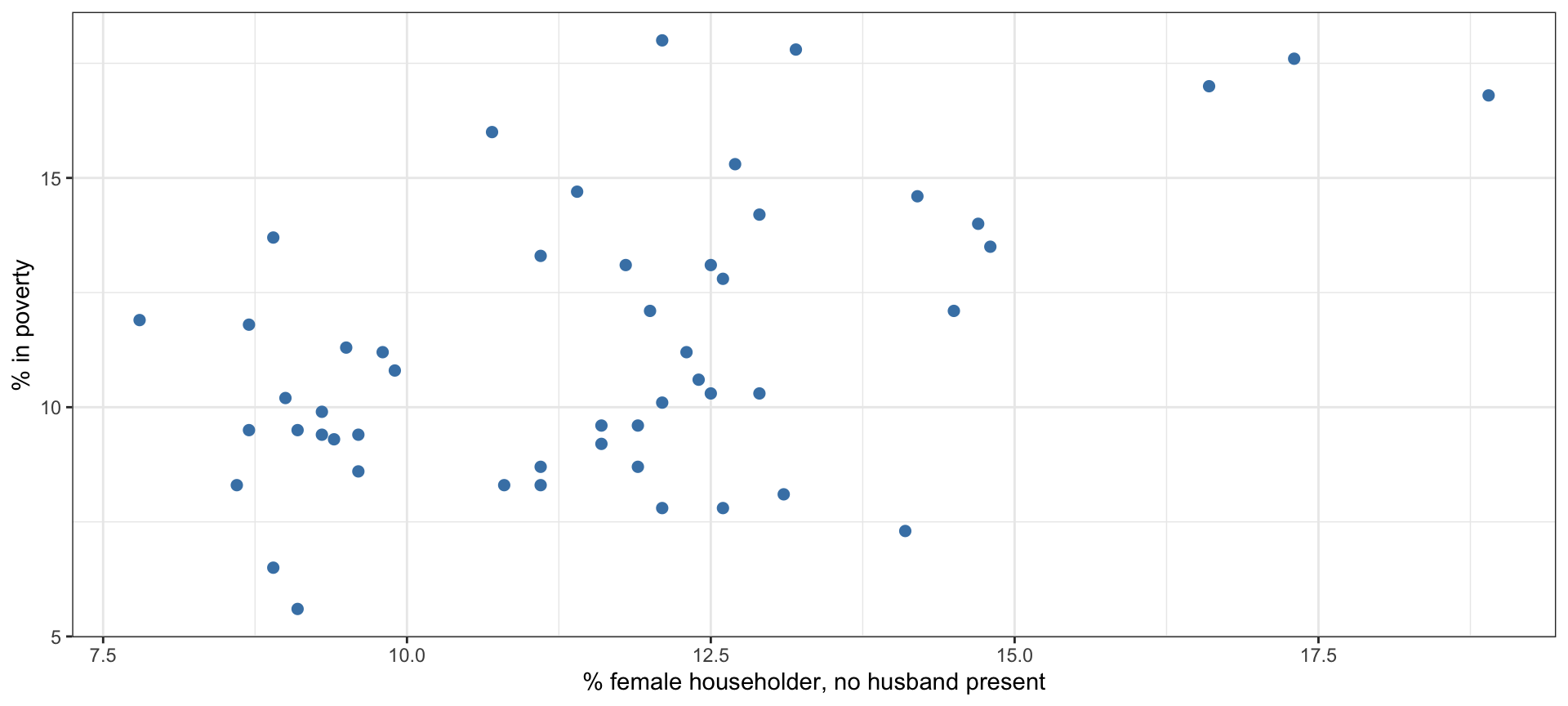
Which of the following is the best guess for the correlation between % in poverty and % female householder (no husband present)?

0.1   -0.6   -0.4   0.9   0.5

Assessing the correlation 📊

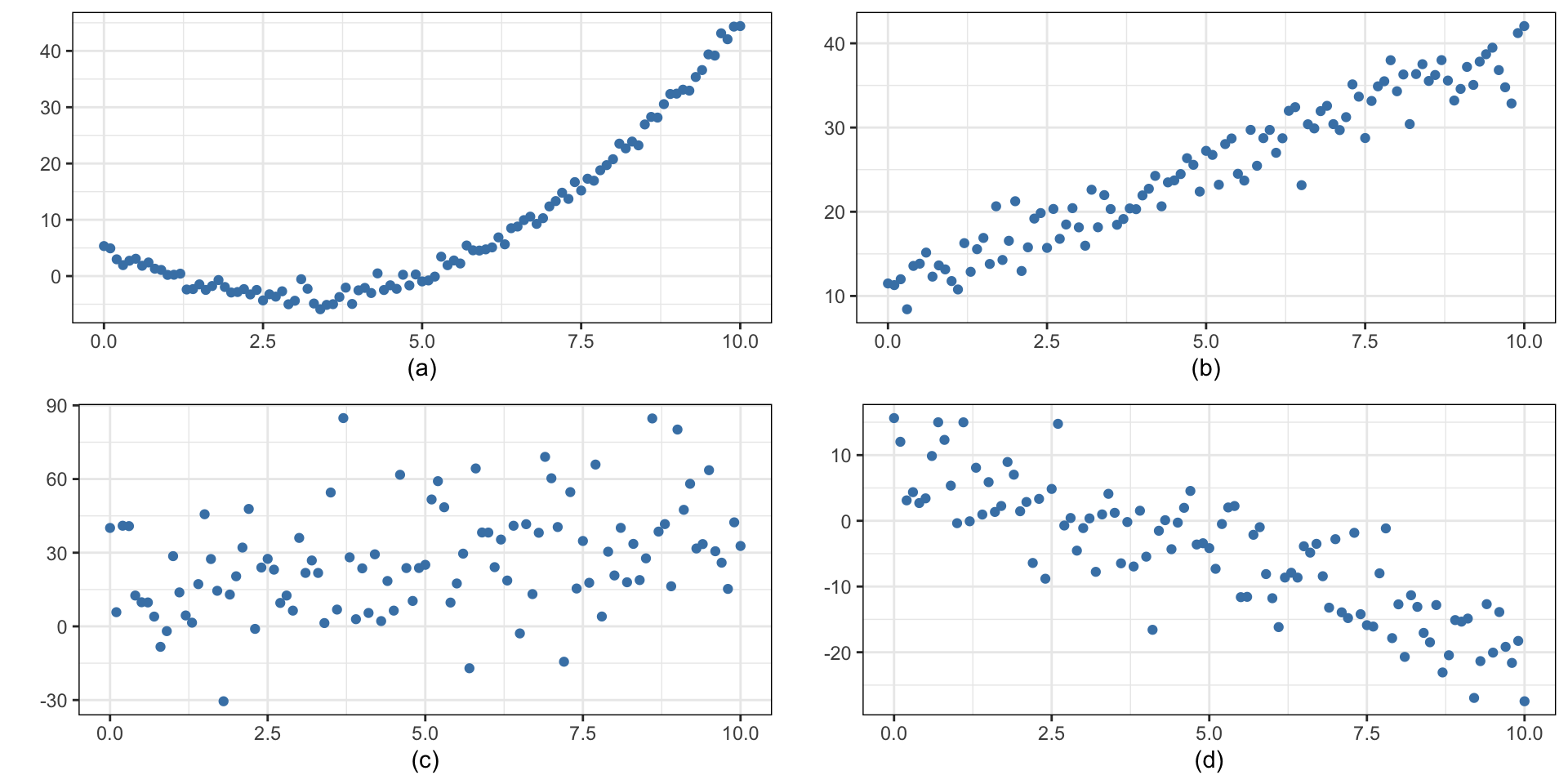
Which of the given plots has the strongest correlation, i.e., correlation coefficient closest to +1 or -1?

Answer

Correlation means linear association, and the strongest linear association is Figure (b). We can actually compute the correlations, and they are:

  • 0.834 (a)
  • 0.966 (b)
  • 0.357 (c)
  • -0.852 (d)

Ignoring Figure (a), what do you notice about the magnitude of the correlations for Figures (b) through (d) ?

Calculating Correlation in R

Calculating the correlation can be done with the cor() function in R.

dat |> 
  summarize(correlation = cor(x,y))

In this, both x and y are variables in a data.frame.

Fitting a line by least squares regression

The Idea

  • We want to fit a straight line of the form: \[ \hat{y} = b_0 + b_1 x \]
  • This line should be as “close” to each point as possible.
    • How do we define “close” ?
  • The model we will use is: \[ Y_i = \beta_{0} + \beta_{1}x_i + \epsilon_{i} \]

Eyeballing the line 📊

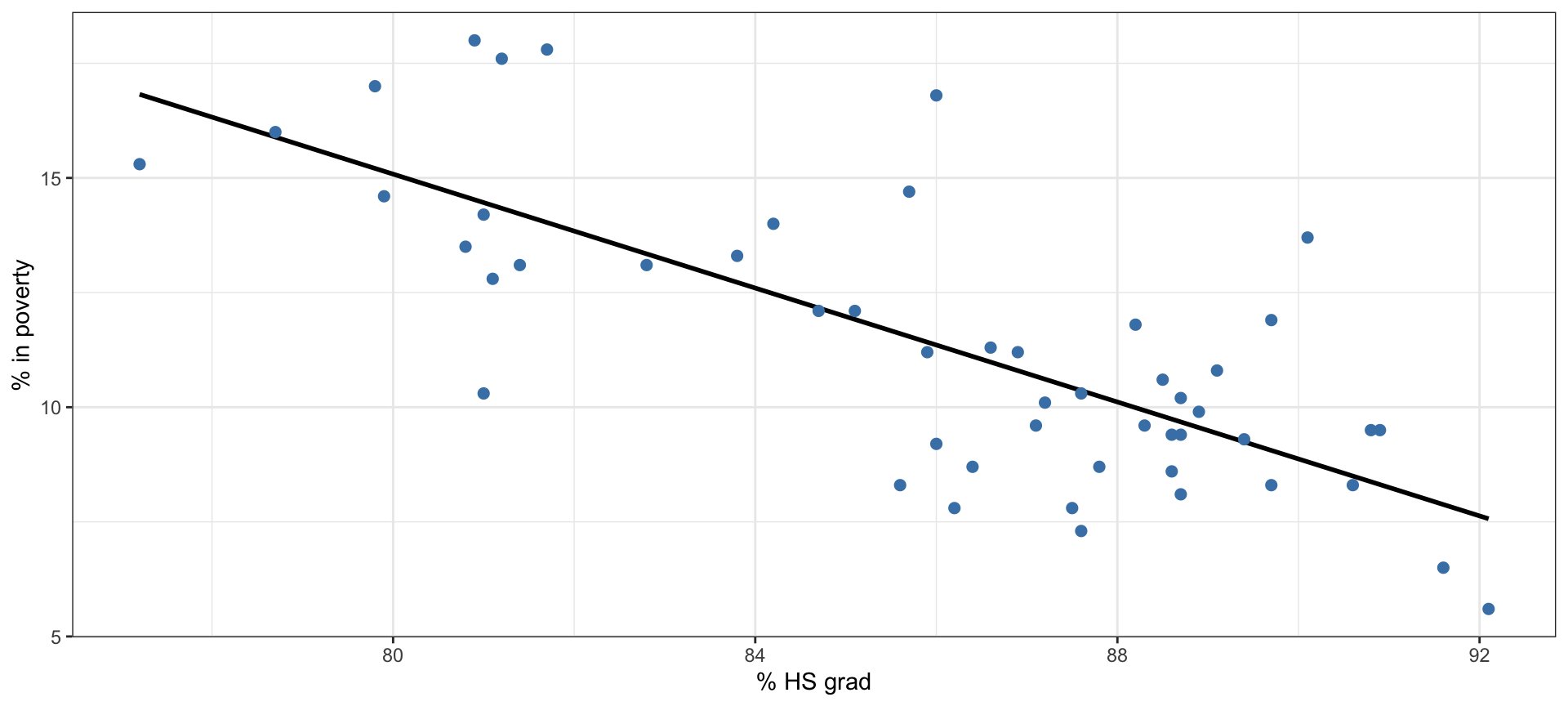
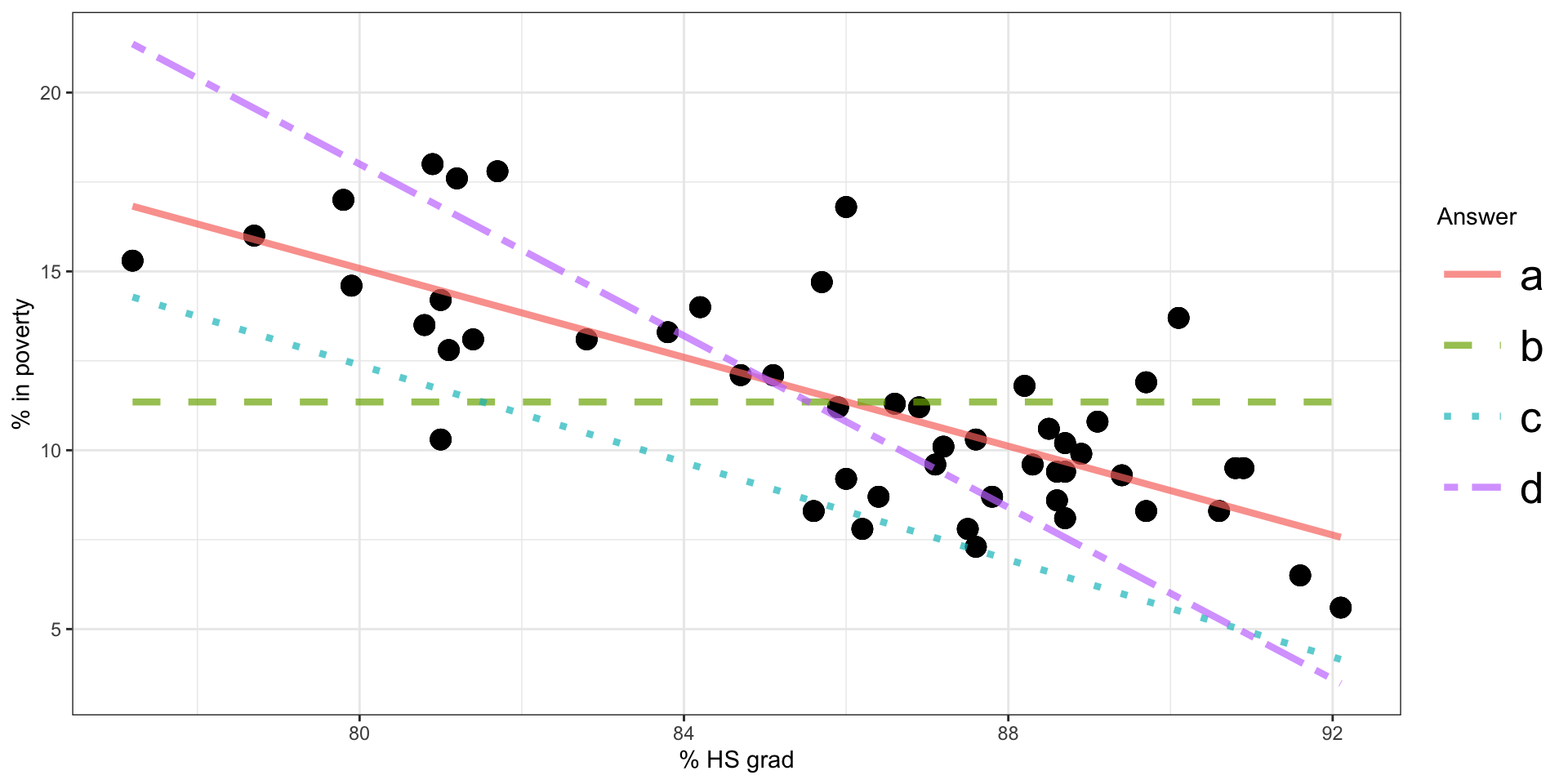
Which of the lines on the figure appears to be the line that best fits the linear relationship between % in poverty and % HS grad? Choose one.