they are easy to work with, easy to implement, and have advantages for interpretation
However, they are limited
the linearity assumption is an approximation; sometimes quite a poor one!
In Lecture 04 we saw that we can improve upon least squares using penalized regression
e.g., ridge and lasso regression
Motivation
Today
We will relax the linearity assumption
Goals: improve flexibility and still maintain interpretability
Start with one predictor and one response variable
Finish with a discussion of how to integrate multiple predictors using the ideas discussed
Polynomials
Polynomials
Polynomial models are something we’ve seen before.
We replace \[
y_i = \beta_0 + \beta_1 x_i + \varepsilon_i,
\] the standard linear model, with \[
y_i = \beta_0 + \beta_1 x_i + \beta_2 x_i^2 + \cdots + \beta_d x_i^d + \varepsilon_i,
\] a \(d^\text{th}\) order (degree) polynomial regression.
Generally speaking, we usually don’t use \(d > 4\) because high-order polynomials are … “funky”, especially near the boundaries of your predictor (near the min and max).
Polynomials in R
In order to add polynomial terms in R, we use the I() function:
mod_poly <-lm(y ~ x +I(x^2) +I(x^3), data = my_data)
We can also use the poly() function:
mod_poly <-lm(y ~poly(x,3), data = my_data)
Include All Terms Up to Degree \(d\)
If you want to include the the order \(d\) term, you need to include all polynomial terms up to \(d\).
Think of this in the context of \(y = \beta_{0} + \beta_{1}x\): if we do not include the intercept term, then the slope estimate will not be correct.
Same idea as we increase the degree \(d\).
Nothing New
There’s really not much more to this idea:
You can include polynomial terms in your regression;
This can help if you see a fairly obvious curvature to the relationship;
Often, this curvature can been seen in residuals vs. predictor plots;
It’s not a panacea, however
Basis Functions
Polynomials are actually a special case of something called basis functions.
The idea:
We have a set of functions that can be applied to any predictor \(X\)
Instead of fitting a linear model in \(X\), we instead fit the functions of \(X\)
For example, if we have \(b_1(X)\), \(b_2(X)\), etc., then \[
y_i = \beta_0 + \beta_1 \cdot b_1(x_i) + \beta_2 \cdot b_2(x_i) + \cdots + \beta_p b_p(x_i) + \varepsilon_i.
\] These basis functions are fixed, known, and pre-specified.
Splines
Splines
Splines are a general mathematical tool for fitting smooth functions that vary more quickly than a single function can keep up with.
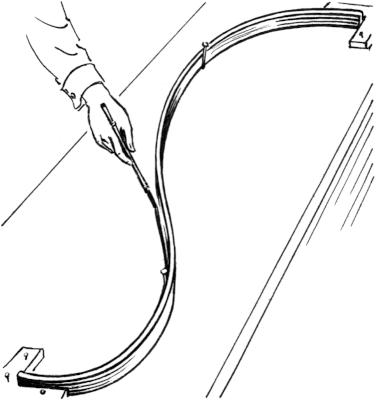
The origin of the word comes from a draftsman’s spline, which is a flexible tool used to draw smooth lines on mechanics diagrams, architectural drawings, and ship plans in the age before computers.
Splines in Mathematics and Statistics
Instead of fitting a high-degree polynomial over the entire range of \(X\), piece-wise polynomial regression involves fitting separate low-degree polynomials piecewise over different regions of \(X\).
This means side-by-side across the range of the \(X\) predictor variable.
For example, a piecewise cubic polynomial would work by fitting a cubic regression model, \[
y_i = \beta_0 + \beta_1 x_i + \beta_2 x_i^2 + \beta_3 x_i^3 + \varepsilon_i
\] where the coefficients are allowed to be different in different areas of the values of \(X\), joined together at points called knots.
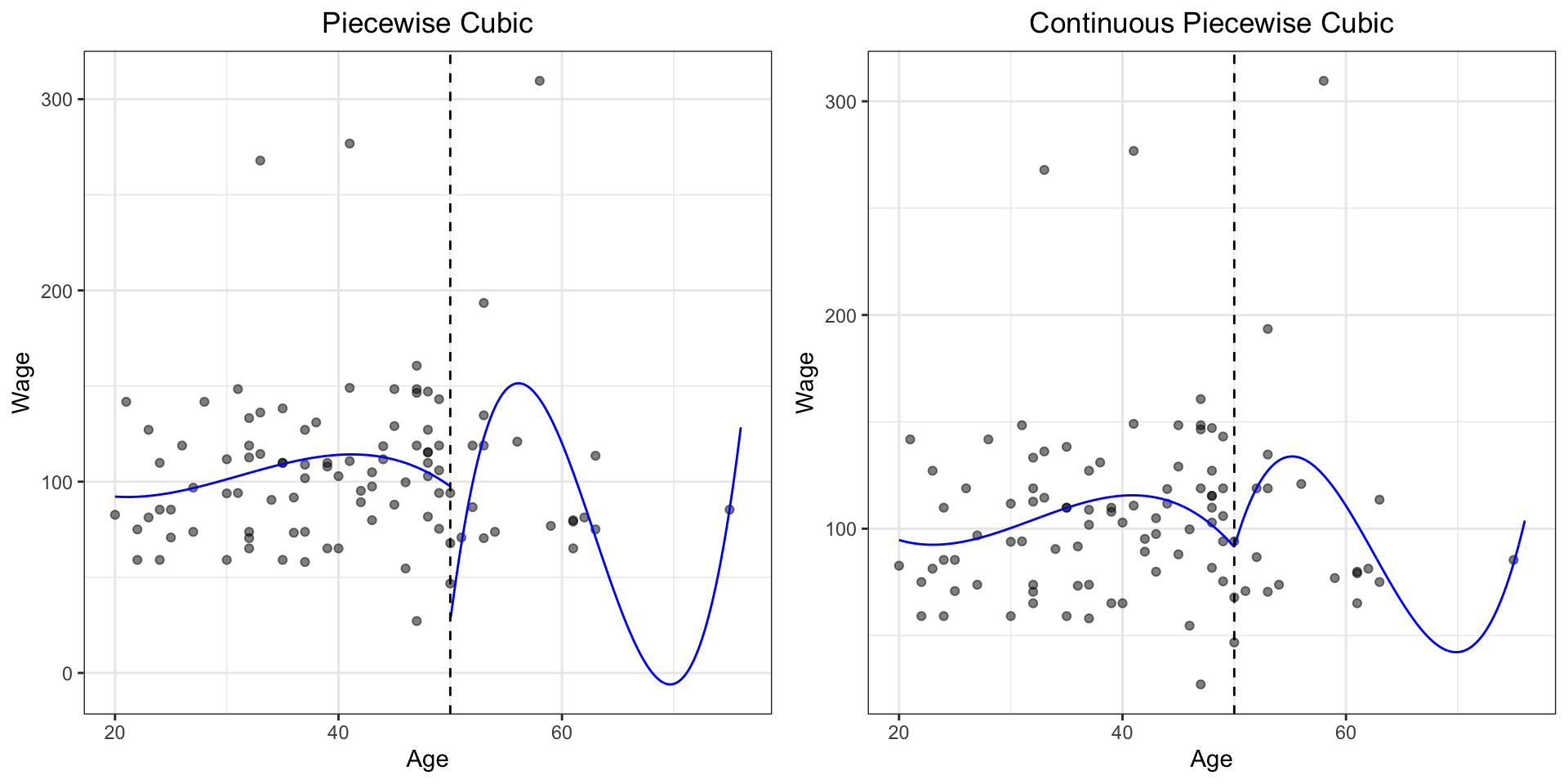
Piecewise Cubic
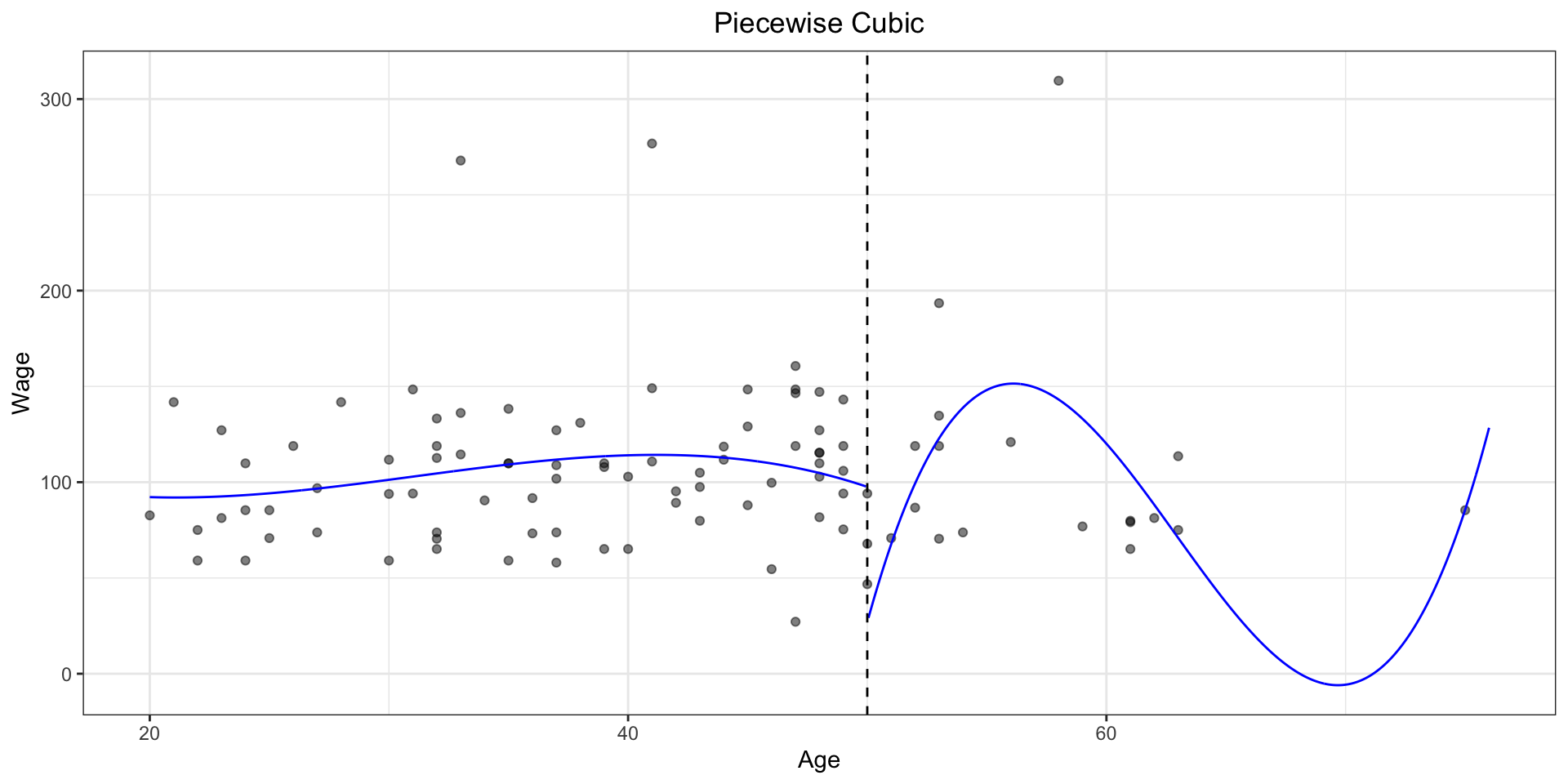
Here, we have a knot at age = 50.
This looks wrong: there is a discontinuity at the intersection
This is only a reasonable thing to do if you can justify why your fit should jump and behave so oddly at this point
Almost always, it cannot be justified (some people try … )
Continuous Piecewise Cubic
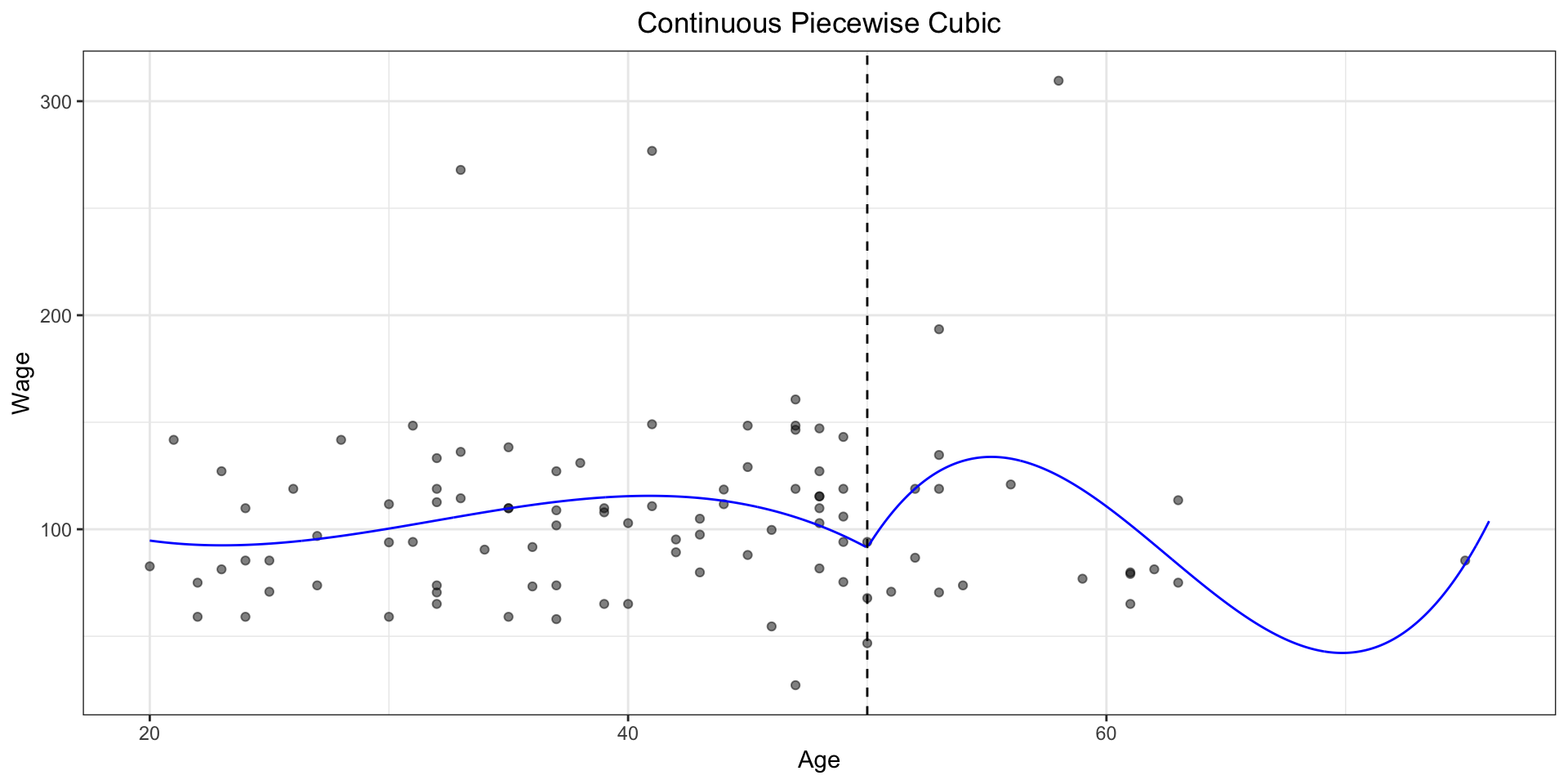
Here, we constrain the function to be continuous at age = 50, but the connection looks weird because it’s not smooth
The slopes change abruptly – the first derivatives do not match.
Cubic Piecewise – First Derivative Contrained
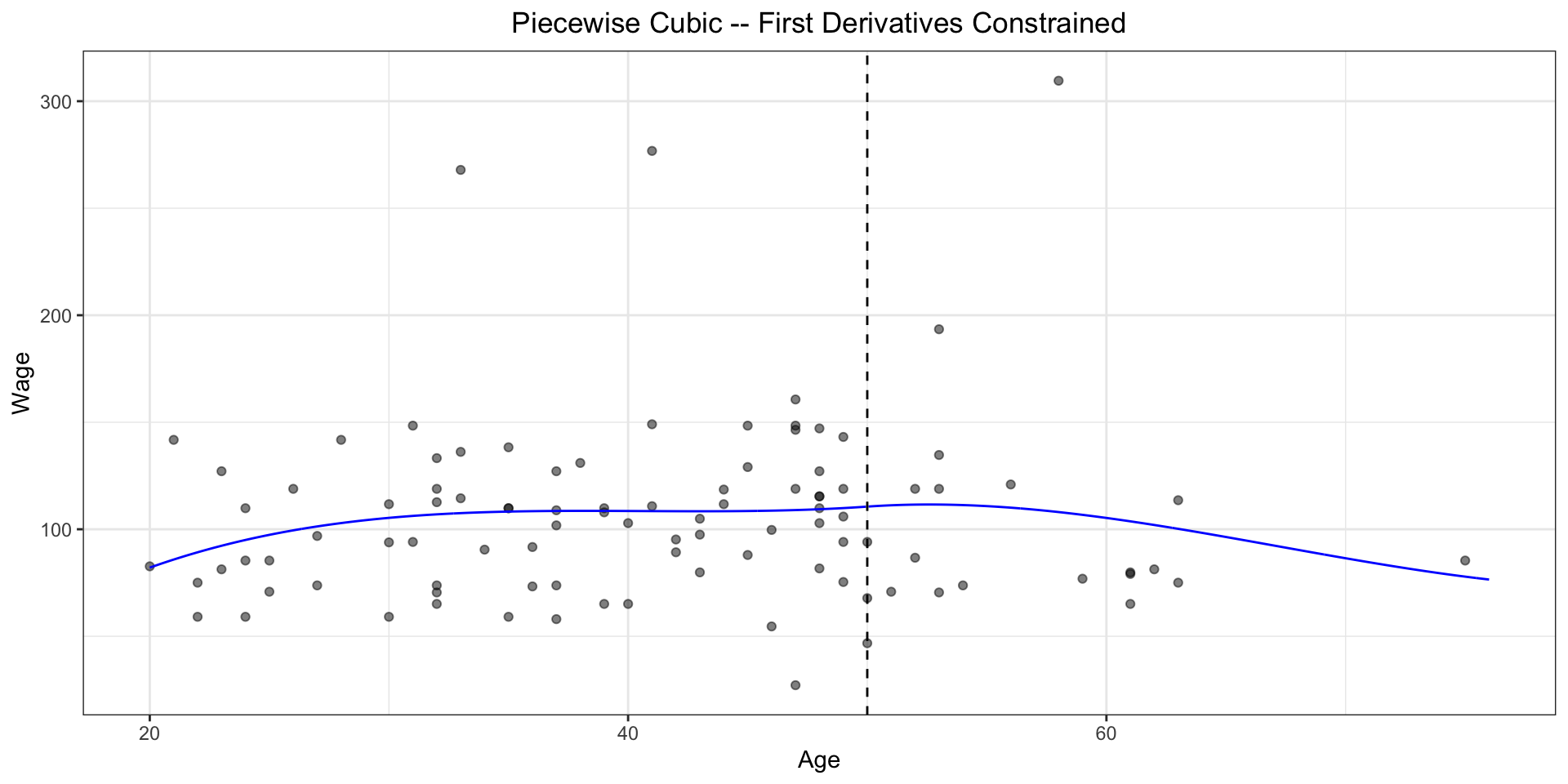
Here, we constrain the function to be continuous at age = 50, and the first derivatives match.
It’s much better, but you can still discern the breakpoint.
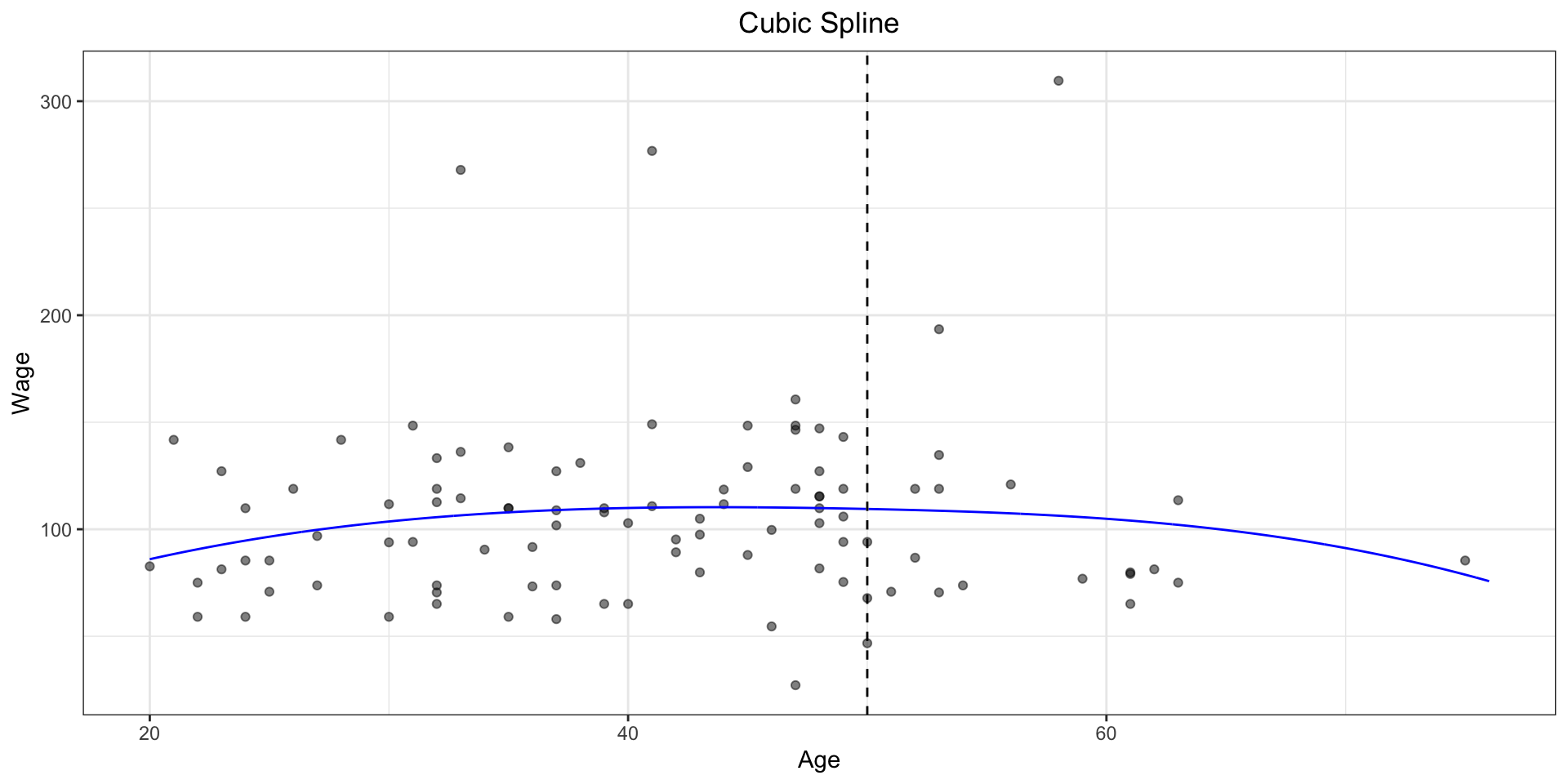
Cubic Spline
If you constrain the first and second derivatives, this is called a cubic spline
This looks smooth at the knots to the naked eye
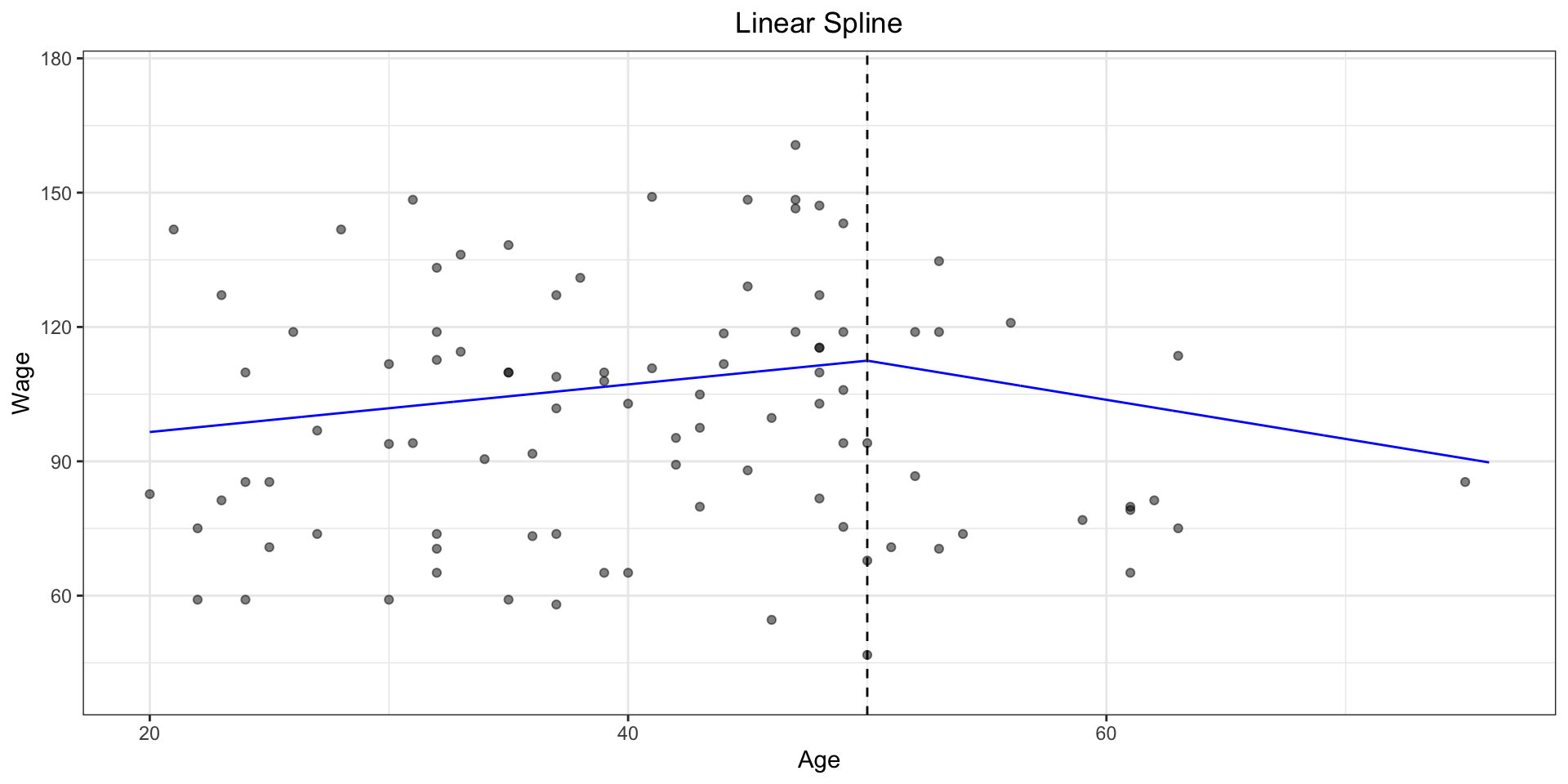
Linear Spline
In general, for a polynomial of degree \(d\), you can constrain up to the \(d-1\)th derivative.
For a linear spline, the most we can force is continuity at the knot (same value on both sides)
Spline Basis Representation
So how exactly does this work for us, with these constraints and requiring a function to be continuous (and its derivatives!)?
We use the basis model from a few slides back:
if we have \(K\) knots, then we can model the response using \(K+3\) total basis functions
the result is fit using least squares
Then we’re back to a world we (mostly) understand.
Derivations
The mathematical details on how the basis functions are defined are provided in the textbook: we won’t worry too much about them.
Let’s focus on how to use them!
Boundary Constraints
Sometimes, if you just run cubic splines in your model, the far left and far right spline basis can have “issues”
this is because there are no constraints and it can “explode”
the result is very high variance at the outer range of the predictor
for very small or very large values of your predictor, things don’t behave nicely
We can fix this by adding in additional boundary constraints
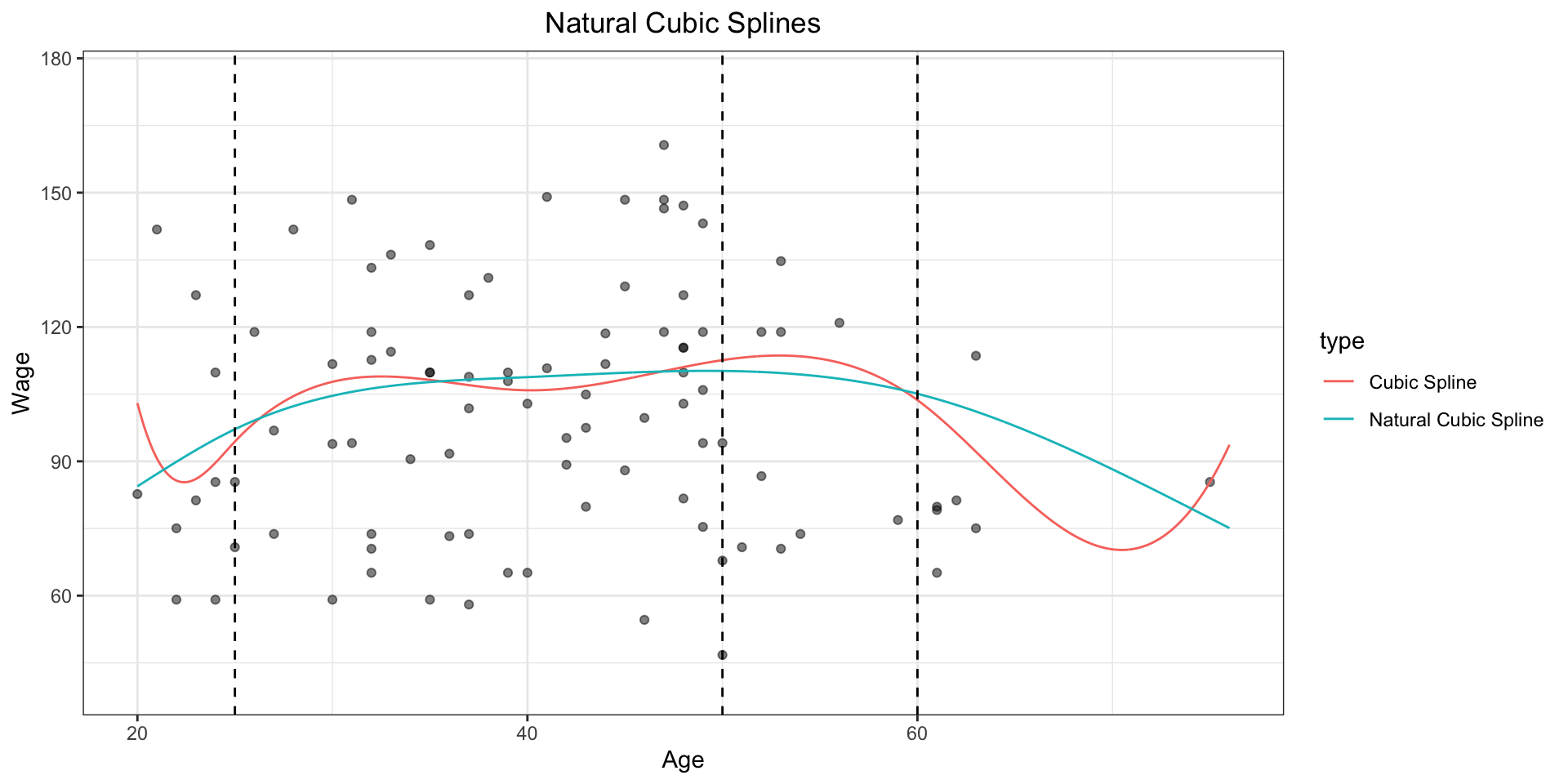
Natural Cubic Splines
The additional boundary constraint is requiring the function to be linear at the boundary
the region where \(X\) is either smaller than the smallest knot, or larger than the largest knot
this particular constraint adds the natural tag, so we would say we are using natural cubic splines
assuming the splines are cubic, of course!
Degrees of Freedom
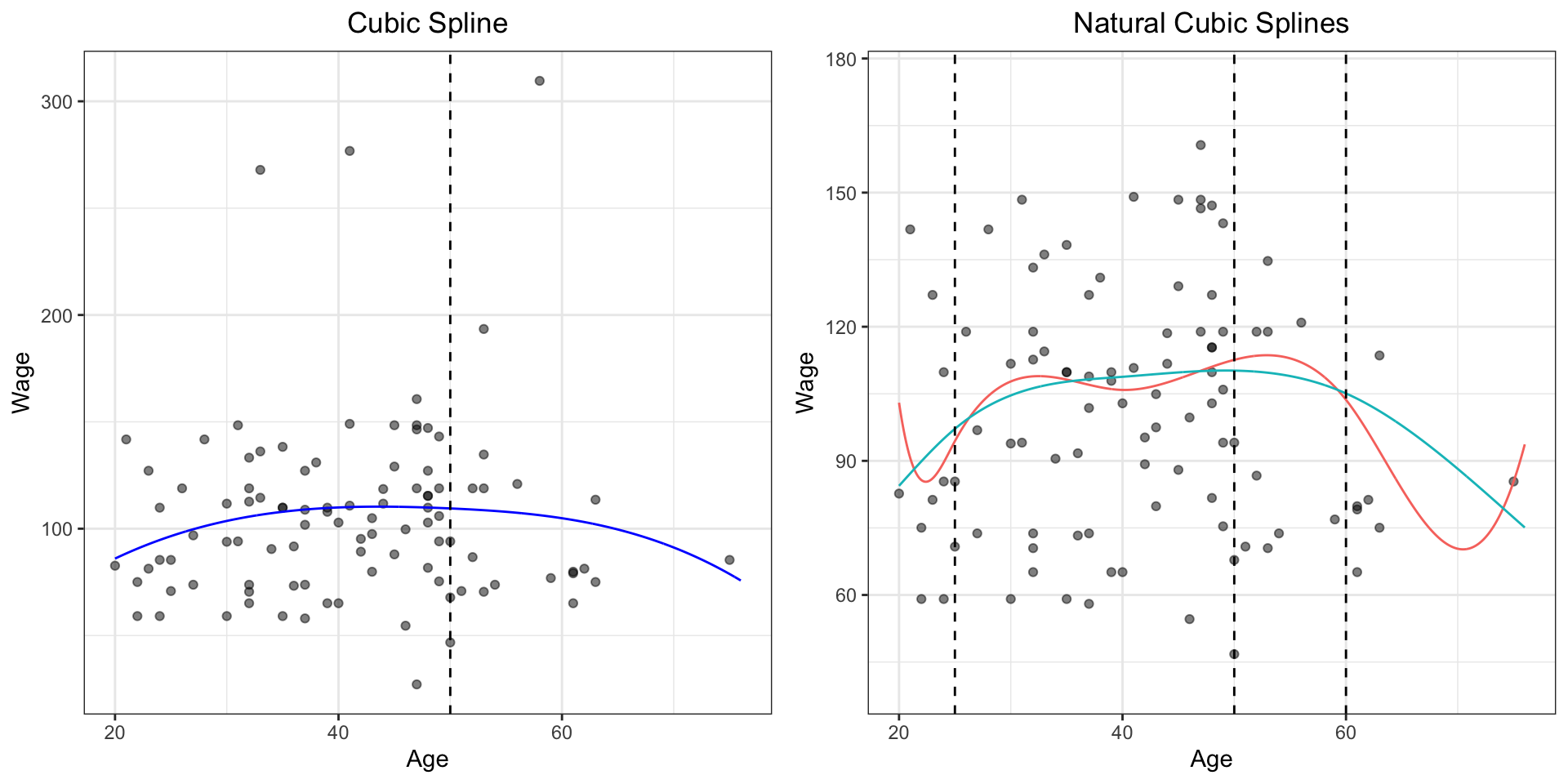
In the left plot (piecewise cubic), we fit 2 (\(K\)) cubic regressions (with 4 parameters each) in two sections. This results in \(4 \times (K+1) = 8\) degrees of freedom.
In the right plot (continuous piecewise cubic), we introduce one (\(K\)) constraint(s) (the value at Age=50 for both sections needs to be the same). This results in \(4 \times (K+1) - K = 3K + 4 = 7\) degrees of freedom.
Degrees of Freedom
In the left plot (cubic spline), we require continuity of value, slope, and curvature at the knot. That’s 3 constraints, at each knot so \(4 \times (K+1) - 3K = K + 4 = 5\) degrees of freedom.
In the right plot (natural spline), we also add 2 boundary constraints (second derivative = 0), so \(4 \times (K+1) - 3K - 2 = K + 2\) degrees of freedom. Because this figure has \(K=3\) knots, the natural spline has \(K+2=5\) degrees of freedom.
Degrees of Freedom
In general, a cubic spline with \(K\) knots has \(K + 4\) degrees of freedom.
In general, a natural cubic spline with \(K\) knots has \(K + 2\) degrees of freedom.
This is useful to know because as we will see in RStudio we can specify either the number of knots \(K\) or just the degrees of freedom.
Note
In R, remove one further degree of freedom when using bs() or ns() because by default, we remove the intercept (it will be added back when performing regression).
How to Place the Knots?
We have talked broadly about how cubic splines can be used.
The use of these objects requires the careful placing of knots
the more knots, the more flexible the regression splines become, and the more “wiggly” a fit you can produce
doesn’t this seems arbitrary?
While you can place extra knots in areas where you feel the function is varying most rapidly, in practice it is most common to simply place the knots evenly across the domain of the predictor.
We do this in R by specifying the degrees-of-freedom we want to use, and then the functions place the knots for us; evenly by default.
How Many Knots?
So how many knots should we us?
One option is … just try some, and see what happens!
not even remotely intellectually satisfying
let’s leverage our work from the last topic and leverage validation!
If we did 10-fold cross-validation, we would
remove 10% of the data at a time
fit a spline with a certain number of knots to the remaining data
predict for the hold-out portion
Repeat this 10 times, then compute the overall cross-validated MSE.
Repeat this for different numbers of knots, and compare the MSEs
choose the number of knots based on the minimum MSE
An Example
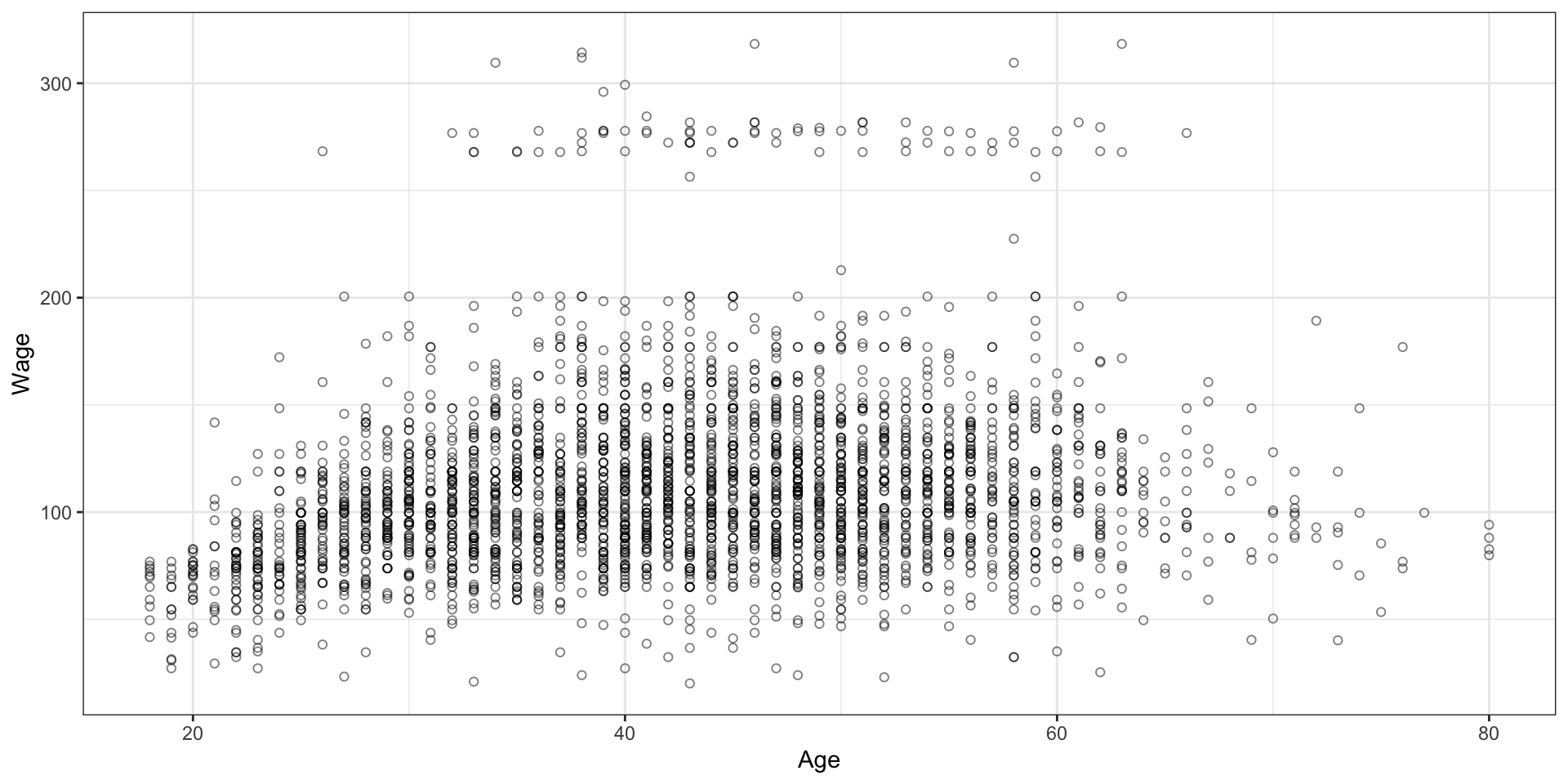
library(ISLR2)data(Wage)
Wage and other data for a group of 3000 male workers in the Mid-Atlantic region.
Variables Wage and Age are interesting - both are continuous numeric (although age is discrete in that it is only calendar year ages).
We used a sample of this dataset in the previous plots
An Example: Wage vs. Age
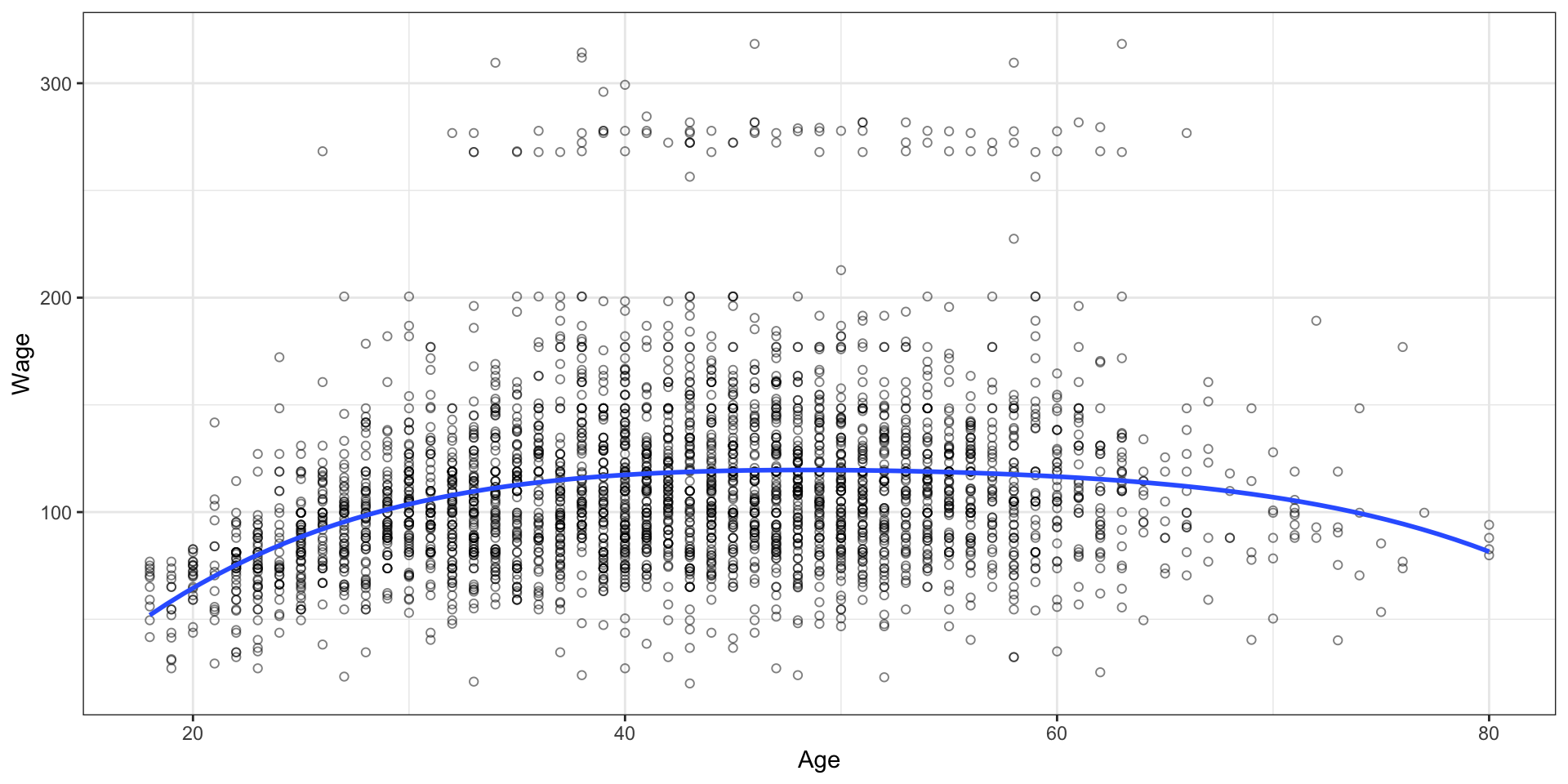
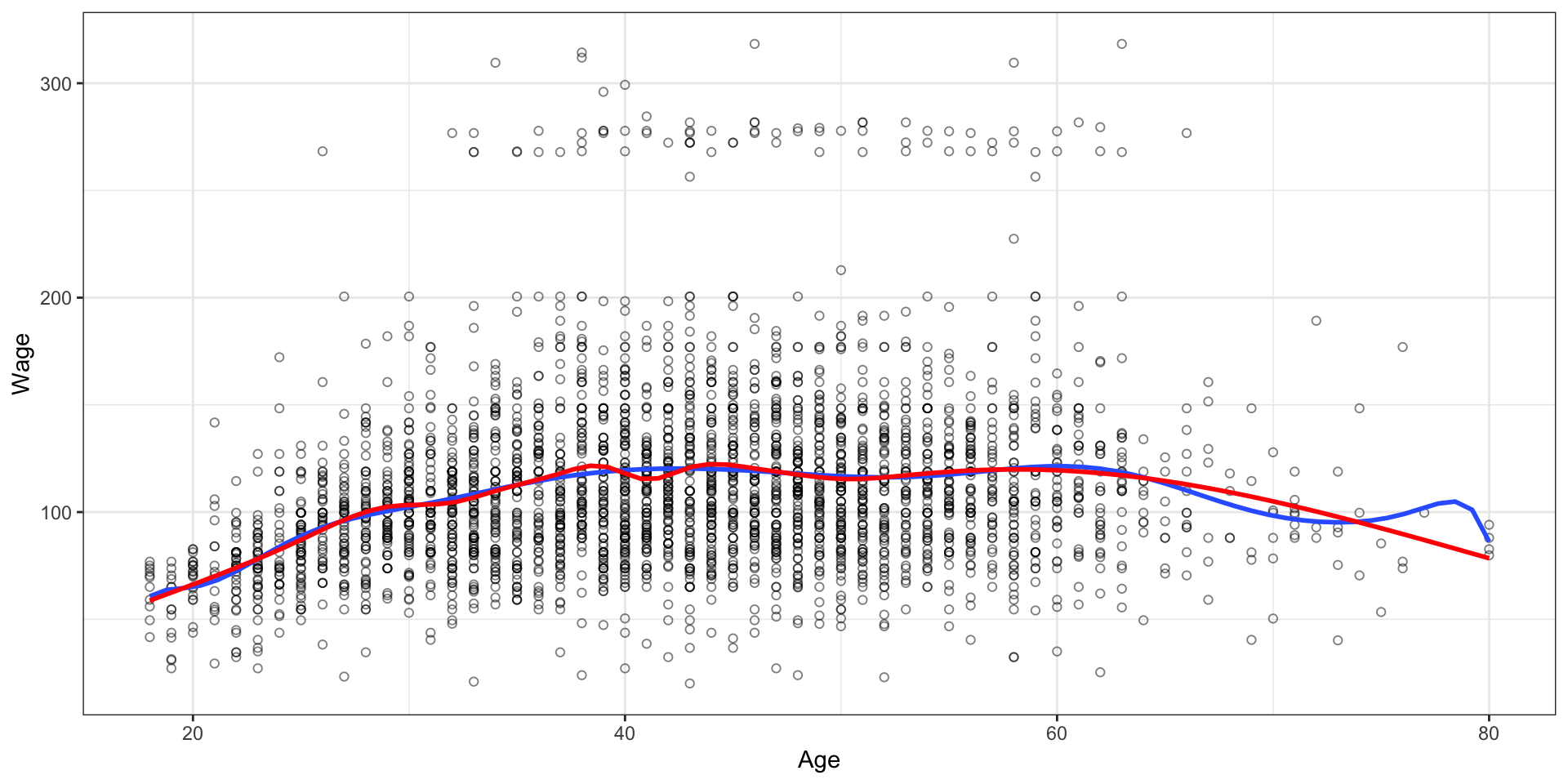
An Example: Model 1 - Polynomial
mod1 <-lm(wage ~poly(age, 4), data = Wage)
An Example: Model 2 - 4df Spline
library(splines)mod2 <-lm(wage ~ns(x = age, df =4), data = Wage)
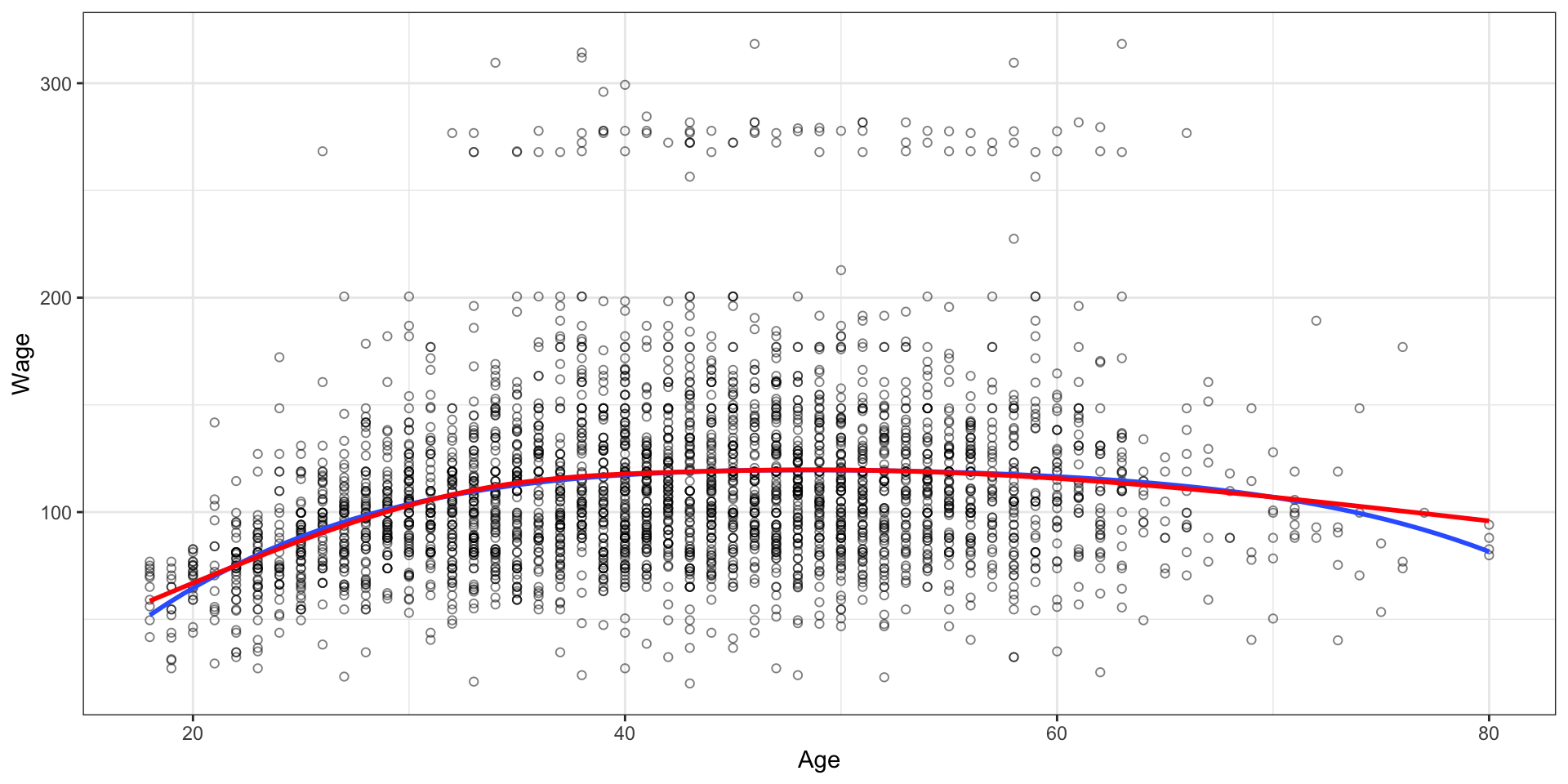
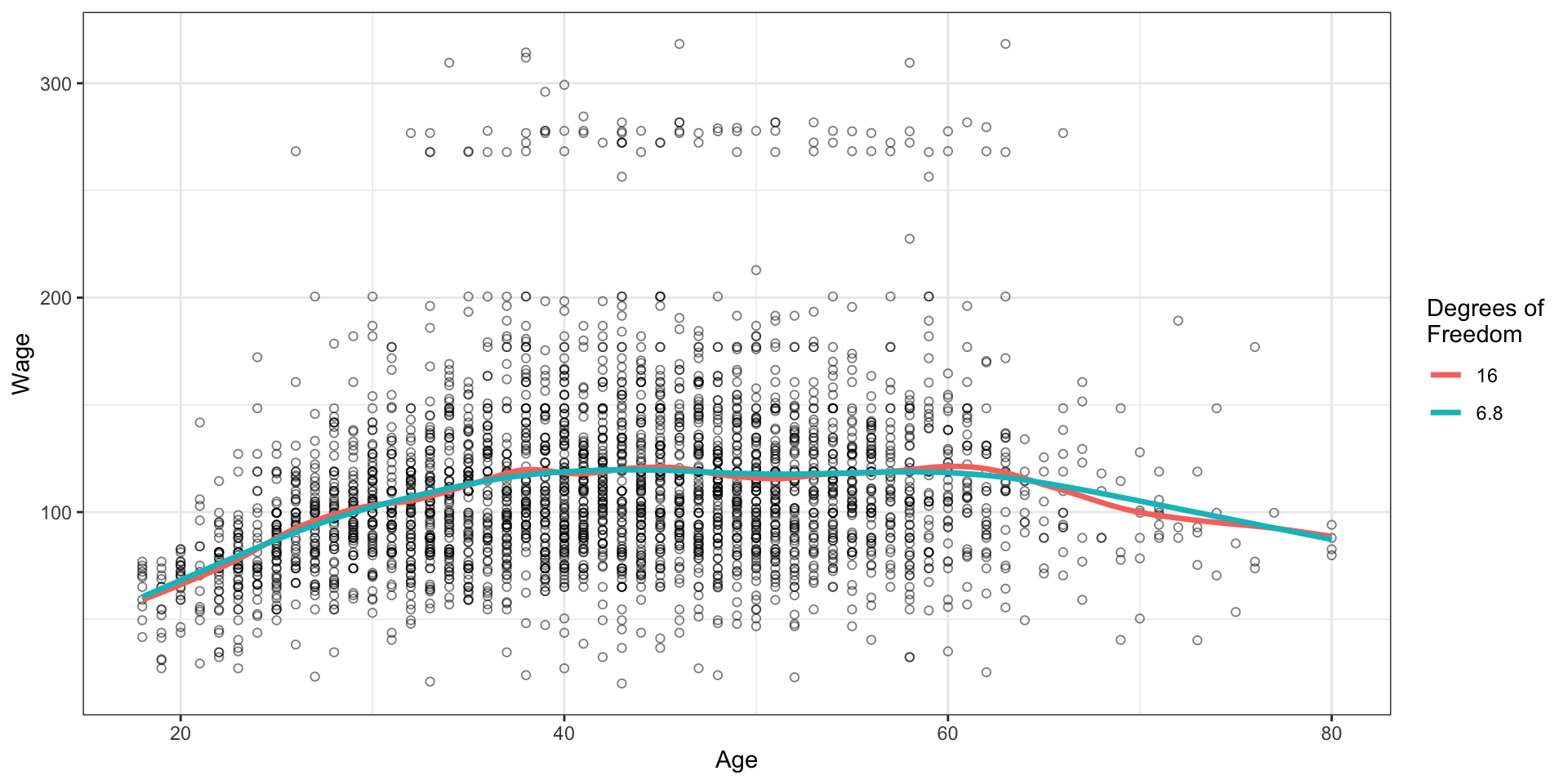
An Example: Model 3 - Higher df Spline
mod3a <-lm(wage ~poly(x = age, degree =14), data = Wage)mod3b <-lm(wage ~ns(x = age, df =15), data = Wage)
Conclusion
While the behaviour through the bulk of the data is very similar:
natural splines have a lot of advantages near the extrema; while
polynomials can go absolutely wild and do silly things.
Smoothing Splines
Smoothing Splines
Regression splines are made by:
using knots
a sequence of basis
then least squares
There is an alternative approach, called smoothing splines, that also produces a spline fit.
normally we want the Mean Square Error (of prediction) to be small
in the extreme, splines allow us to fit every single “wiggly” bit of the data: a massive case of overfitting!
What we actually want is a fit that makes the MSE small, but is also smooth.
Steal an Idea from Before
We could add a penalty term!
same concept as for lasso and ridge regression
don’t just minimize the residual sum of squares (the MSE in part)
add a second term to the loss function: a penalty term which requires that the second derivative of the function have a variability penalty.
Broadly, a penalty of \(\lambda \int \left(g''(t)\right)^2dt\) is a penalty on the roughness of the fit
large if the function is “wiggly”, and zero otherwise
the \(\lambda\), like the parameter for lasso, allows us to control how aggressively we want to penalize wiggliness
it would be the tuning parameter here
How Do We Choose \(\lambda\)?
An extreme version of a smoothing spline would be to choose a \(\lambda\) of zero.
This is equivalent to putting a knot at every single value of the original data, for a natural cubic spline.
That seems problematic
ton of knots; an incredibly “wiggly” prediction
prediction goes through every single data point; overfitting
This is where non-zero values of \(\lambda\) shine
as \(\lambda\) increases, smoothness is enforced
the amount of “wiggliness” is forced to relax
we end up with lower “Effective Degrees of Freedom”
in other words, not as silly in the wiggly!
definitely technical terminology in the statistical literature …
So we don’t need to choose where the knots go - we just need to choose \(\lambda\).
GLMs allow us to keep the familiar regression framework while adapting it to many different types of response variables.
GLM Example
Consider a data set from the book called Bikeshare.
The response is bikers: the number of hourly users of a bike sharing program in Washington, DC
This response value is neither qualitative nor quantitative
instead, it takes on non-negative integer values, or counts
We will fit a model to predict bikers using:
mnth (month of the year, factor)
hr (hour of the day, factor (0-23))
workingday (indicator variable, 1 if neither a weekend nor a holiday)
temp (normalized temperature in \(^{\circ}\)C, numeric)
weathersit (describes weather; clear, misty or cloudy, light rain or light snow, heavy rain or heavy snow, factor)
Bikeshare Data
bikers is integer valued and non-negative
Using our usual linear regression is going to miss a lot of the structure
Instead, we consider a Poisson model
The Poisson distribution models counts from some process, minimum zero, and discrete/integer-valued.
If \(Y\) follows the Poisson distribution, then \[
\text{P}[Y = k] = \frac{e^{-\lambda}\lambda^k}{k!}, \quad \text{ for } k=0, 1, \cdots
\] The parameter of a Poisson is \(\lambda\), the so-called rate. We will model bikers as a Poisson random variate by using a GLM (glm) framework in R.
The Poisson Distribution
The Poisson distribution is controlled by a single parameter, \(\lambda\), called the rate.
\(\lambda\) is both:
the expected value of the distribution
the variance of the distribution
\[
E(Y)=\mathrm{Var}(Y)=\lambda
\]
As \(\lambda\) increases, we expect larger counts to occur more frequently.
Interpreting \(\lambda\)
Suppose \(Y\) is the number of people using a bike in an hour.
If \(\lambda = 2\), we expect about 2 bikers per hour.
If \(\lambda = 10\), we expect about 10 bikers per hour.
If \(\lambda = 25\), we expect about 25 bikers per hour.
Changing \(\lambda\) shifts the entire distribution of possible counts.
Interpreting \(\lambda\) for the bikeshare
For the bike-sharing data, it would be unreasonable to assume that all observations have the same rate.
We would expect:
more riders during commuting hours;
more riders on pleasant days;
fewer riders during bad weather;
seasonal differences throughout the year.
From One \(\lambda\) to Many
Instead of using a single value of \(\lambda\), we allow \(\lambda\) to change from observation to observation.
\[
\lambda_i
=
f(x_i)
\]
where \(x_i\) represents the predictor values for observation \(i\).
Poisson Regression
Since \(\lambda_i\) must always be positive,
\[
\lambda_i > 0,
\]
we cannot model it directly using a linear equation.
Higher temperatures are associated with increased ridership.
Working days are associated with slightly lower ridership than weekends and holidays.
Worse weather conditions are associated with lower ridership.
The effects become larger as weather conditions deteriorate.
All predictors are statistically significant (\(p < 0.001\)).
Generalized Additive Models
Generalized Additive Models
Earlier we were discussing the use of polynomials and splines.
All of the examples we discussed had one predictor to go with the one response, e.g., the Wage data, with wage versus age.
Generalized Additive Models (GAMs for short) provide a framework for extending linear and generalized linear models by allowing non-linear functions of each predictor, while maintaining the linearity.
GAMs for Regression
A natural way to extend \[
y_i = \beta_0 + \beta_1 x_{i1} + \cdots + \beta_p x_{ip} + \varepsilon_i
\] in order to allow for non-linear relationships is to replace each component \(\beta_j x_{ij}\) with a smooth, non-linear function of \(x_{ij}\), \(f_j (x_{ij})\), giving \[
\begin{aligned}
y_i &= \beta_0 + \sum_{j=1}^{p} f_j(x_{ij}) + \varepsilon_i \\
&= \beta_0 + f_1(x_{i1}) + f_2(x_{i2}) + \cdots + f_p(x_{ip}) + \varepsilon_i.
\end{aligned}
\] These were invented in the late 1980s by Trevor Hastie and Rob Tibshirani during their PhDs at Stanford; the book on them came out in the early 1990s.
Extending the Earlier Methods
All of the earlier methods: polynomials, cubic regression splines, natural cubic regression splines, and smoothing splines, can all be used as building blocks for fitting additive models.
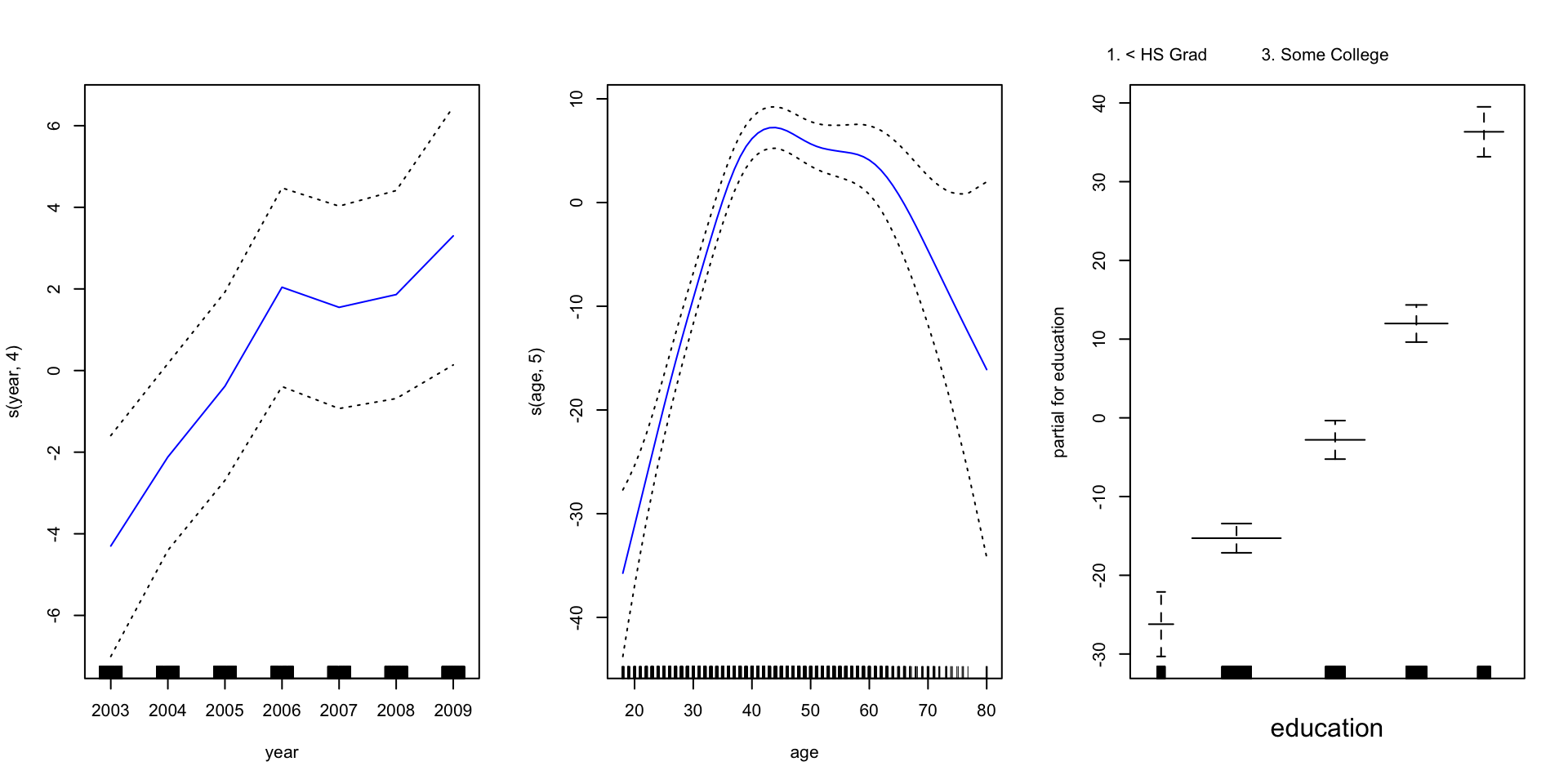
library(gam)mod_gam <-gam(wage ~s(year, 4) +s(age, 5) + education,data = Wage)plot(mod_gam, se =TRUE, col ="blue")
Interpretation
From these three panels, we see:
holding all else equal, wage appears to increase steadily by year (inflation), with a dip in 2007
holding all else equal, the relationship between wages and age appears to be approximately linear from ages 20 to 40, then has some distinct nonlinear characteristics, with a fairly rapid tail-off at or around 65 years of age
holding all else equal, there are distinct bands of wages for each education bracket, and it is rare for even the highest extremes from a bracket to break into the next
Pros and Cons
Pro: GAMs allow us to fit a non-linear \(f_j\) to each \(X_j\), with possibly different criteria and parameters - we do not have to try out many different transformations on each variable individually
Pro: non-linear fits can potentially increase accuracy
Pro: additivity means we can examine individual predictor effects
Pro: the smoothness of each \(f_j\) can be summarized
Con: the model is restricted to be additive, and interactions can be missed - while they can be manually added, they are tricky.
Summary
We have introduced smooth functions of predictors, via polynomial and spline transformations, and also introduced a highly flexible modelling framework in the GAM.
GLMs have also been centered on a general model, not just Binomial, allowing more general regression techniques to be applied.
Interpretation of the new models can be fairly easily done by looking at partial plots of the prediction, which is easy to do by simply plotting the model object.
In the lab, we will do a full worked example where we explore how the choices of df and whether or not to smooth come into play for a set of predictors.
Next Topic
Our next topic is the first that could be considered “machine learning” by some people: decision trees! This will round out the first half of the course.
Readings
The material of this week is Chapters 7.1-7.5, 4.6, and 7.7 of ISLR2, discussing polynomial regression, basis functions and spline models, GLMs and GAMs.
Next week, we will continue into Chapter 8, and begin discussing decision trees. Readings are Chapters 8.1, 8.2