Lecture 02 – Linear Regression
AMOD-5440
Trent University
2026-09-18
Linear Models
Linear Regression
In a past course, you have likely seen some form of regression, which is a short-hand for the general class of linear models where the response is related to a linear combination of predictors via equality: \[ Y = f(X) = \beta_0 + \sum_{j=1}^{p} \beta_j x_j + \varepsilon \]
This model allows \(p\) predictors \(X\) to be combined via addition, and scalar multiplication, to model an observed \(Y\), with additive noise \(\varepsilon\). In simpest form, this is simple linear regression, where \[ y = \beta_0 + \beta_1 x + \varepsilon. \]
Simple Linear Regression
A new piece of notation that will use through the rest of the semester: \[ Y \approx \beta_0 + \beta_1 X. \] This is used in the form of “approximately modelled as”. In R, this is represented as the \(\sim\) operator, e.g.,
From such an equation model, we obtain two estimates of unknown constants: \(\beta_0\) estimated by \(\hat{\beta}_{0}\) and \(\beta_1\) estimated by \(\hat{\beta}_{1}\). These are known as the model coefficients.
Note: the use of “hats” indicates estimates, so \(\hat{\beta}_{0}\) is our estimate for the parameter (unknown constant) \(\beta_0\).
Estimating the Coefficients
We don’t know \(\beta_0\) or \(\beta_1\). We want to estimate them, so we can use the results to predict things. Accordingly, we need to use the available data to make an educated guess as to their values: estimation!
The data consists of pairs: \[
(x_1, y_1), (x_2, y_2), \ldots, (x_n, y_n)
\] and then our goal is to obtain coefficient estimates \(\hat{\beta}_{0}\) and \(\hat{\beta}_{1}\) such that the linear model fits the data “well” - that is, so \(y_i \approx \hat{\beta}_{0} + \hat{\beta}_{1} x_i\) for all
\(i=1,2,\ldots,n\).
How?
We do this by the method of least squares: minimize the sum of the squared errors (differences) between the observed \(y_i\) and the estimated \(\hat{\beta}_{0} + \hat{\beta}_{1}x_i\).
There’s some math here (calculus derivations) … but in practice, we use a computer.
Accuracy
Recall from last week, we briefly discussed accuracy in our estimates. The model \[ Y = \beta_0 + \beta_1 X + \varepsilon \] may only be an approximation for \(f(\cdot)\), the true, underlying, relationship between \(Y\) and \(X\); that is, \(Y = f(X)\).
This approximation is the best one possible using a linear relationship to approximate the true relationship: while we don’t truly believe the relationship is linear, this is the simplest and easiest working model.
Non-Linear TRUE relationship
If the true relationship is not linear, then what are the implications for us? How might we handle that situation?
A Simulation Example
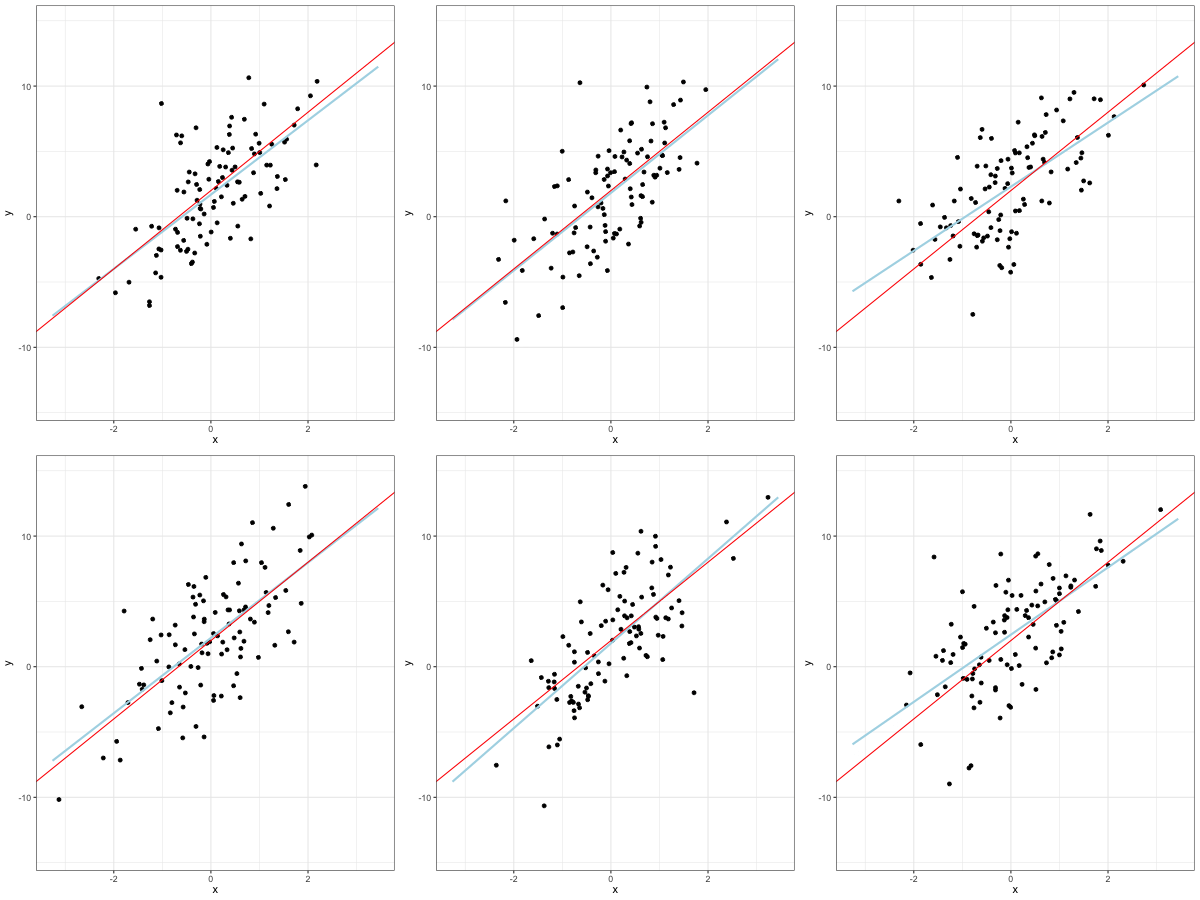
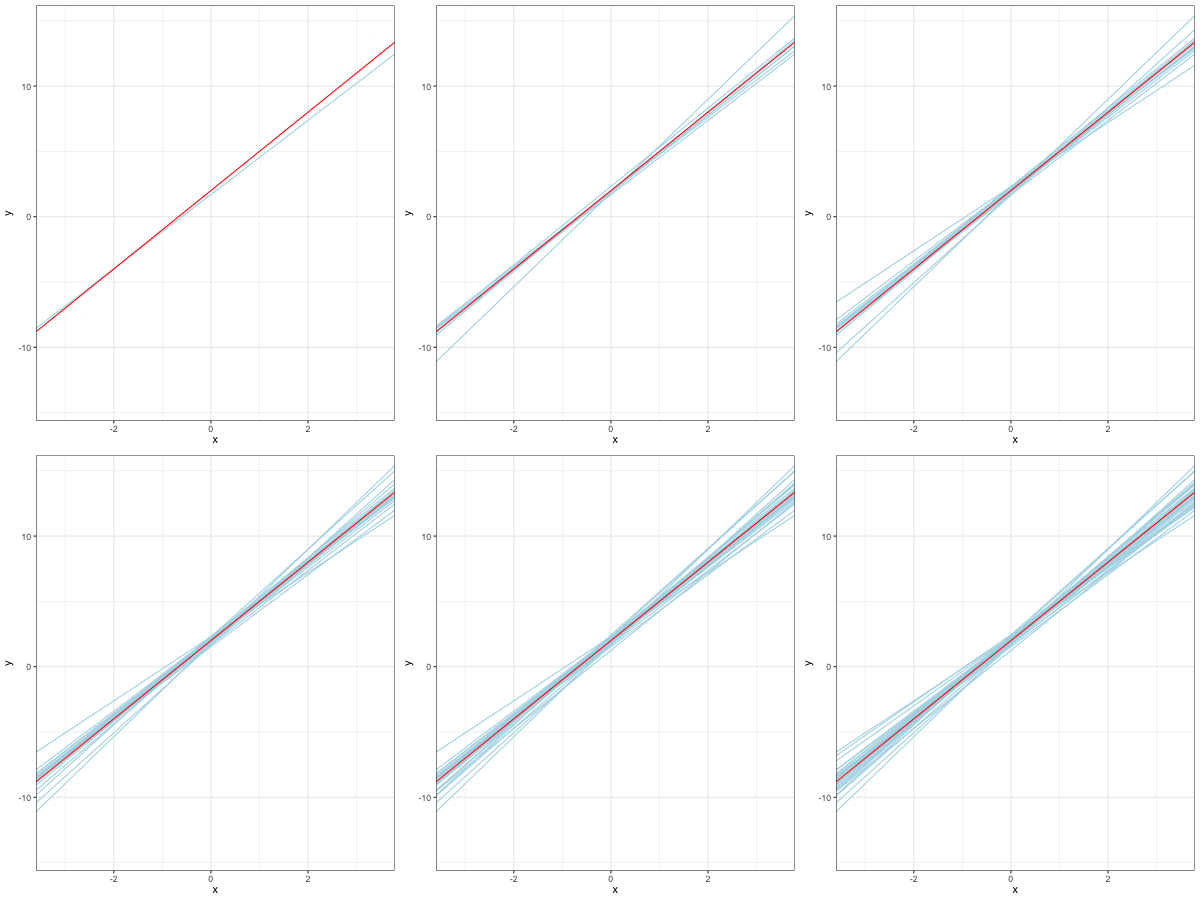
A simulated data set, with \(f(X) = 2 + 3 X\) - the red line represents this true result.
Bias
If we use the sample mean, \(\bar{X}\), to estimate the population mean \(\mu\), then this estimate is said to be unbiased: on average, we expect \(\bar{X}\) to equal \(\mu\). But what does this actually mean?
We can think of this as saying: using one set of observations, our estimate might over-estimate \(\mu\); using a different set, we might under-estimate it. But if you consider a huge number of estimates (so \(\bar{X}_1\), \(\bar{X}_2\), and so on), then the average of these estimates will equal exactly \(\mu\). In probabilistic terms,
\[ E[\bar{X}] = \mu \]
Bias for Least Squares and Regression
The property of unbiasedness holds for the least squares coefficients, so \(\hat{\beta}_0\) and \(\hat{\beta}_1\) are unbiased - on average, we can expect them to equal the true, underlying \(\beta_0\) and \(\beta_1\).
That earlier simulation plot shows this: the spread of the lines around the true (red) line is fairly symmetric, so if we averaged across the different blue lines, we’d get the red line: on average, they are exactly correct.
Back to Our Simulation
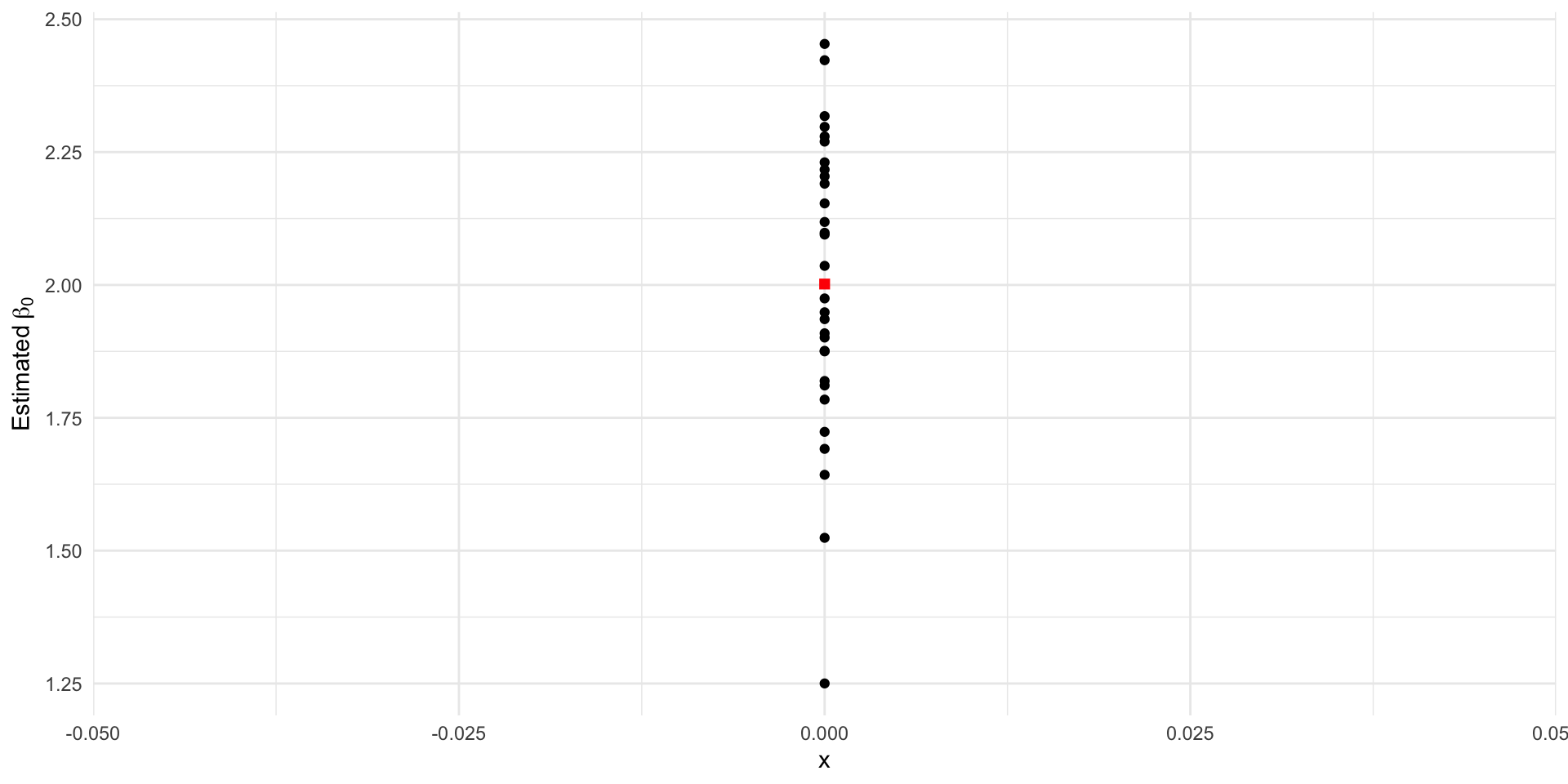
These are our estimated intercepts, with the average coloured red. Remember that we generated the data with \(\beta_0 = 2\). The mean estimate is 2.001.
Back to Our Simulation
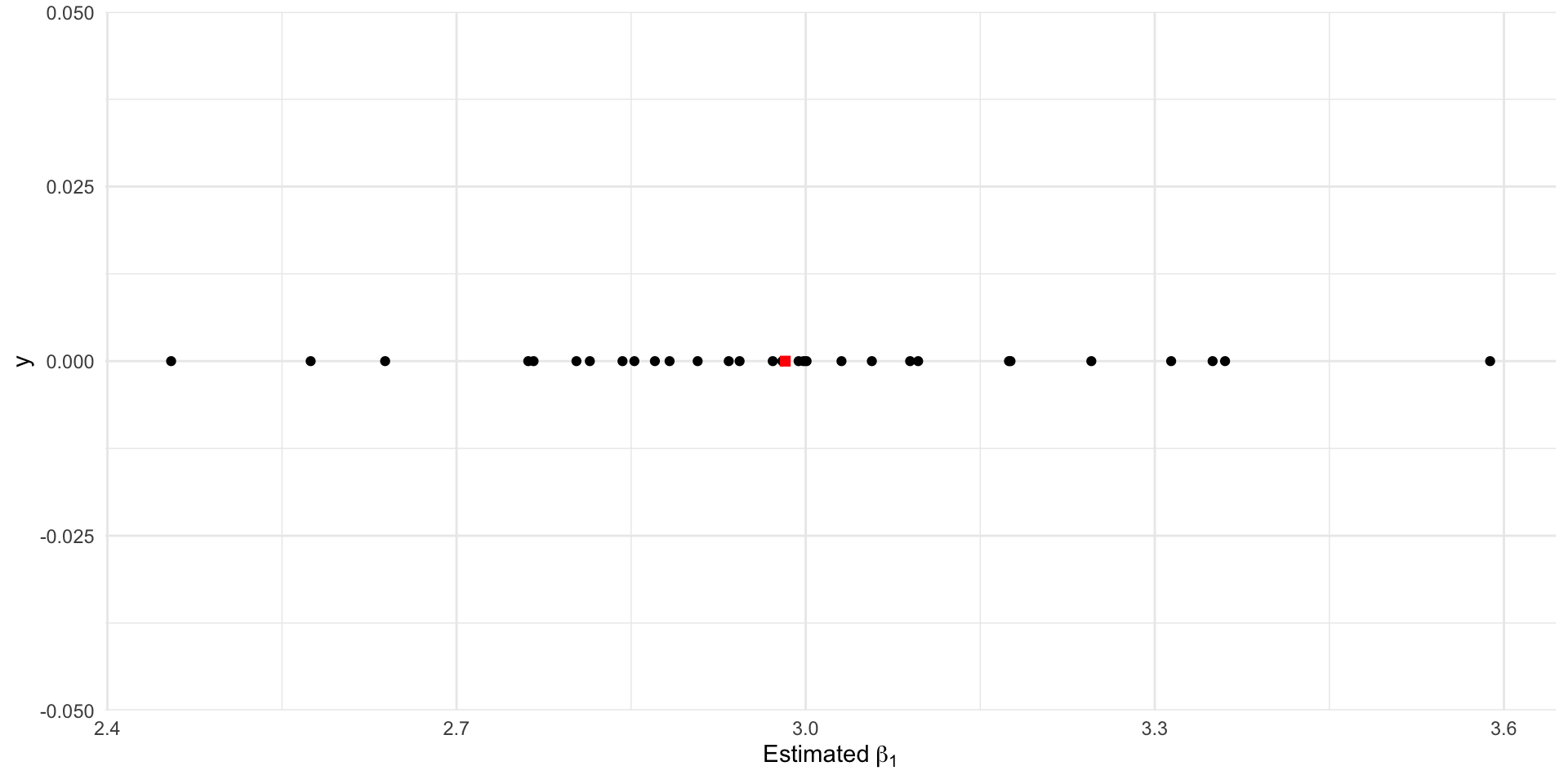
These are our estimated intercepts, with the average coloured red. Remember that we generated the data with \(\beta_1 = 3\). The mean estimate is 2.982.
Accuracy: Continuing the Analogy
The SD of an estimator’s sampling distribution is called the standard error.
For \(\bar{X}\), this is
\[ SE[\bar{X}] = \frac{\sigma}{\sqrt{n}} \]
This is used to compute confidence intervals, and also p-values in some cases.
Standard Errors for Regression
As the estimators \(\hat{\beta}_0\) and \(\hat{\beta}_1\) are random variables, just like \(\bar{X}\), that means they have standard errors that we can compute. If we take the first generated dataset for our example, we can use this SE to visualize the uncertainty in the estimates (and therefore fitted line).
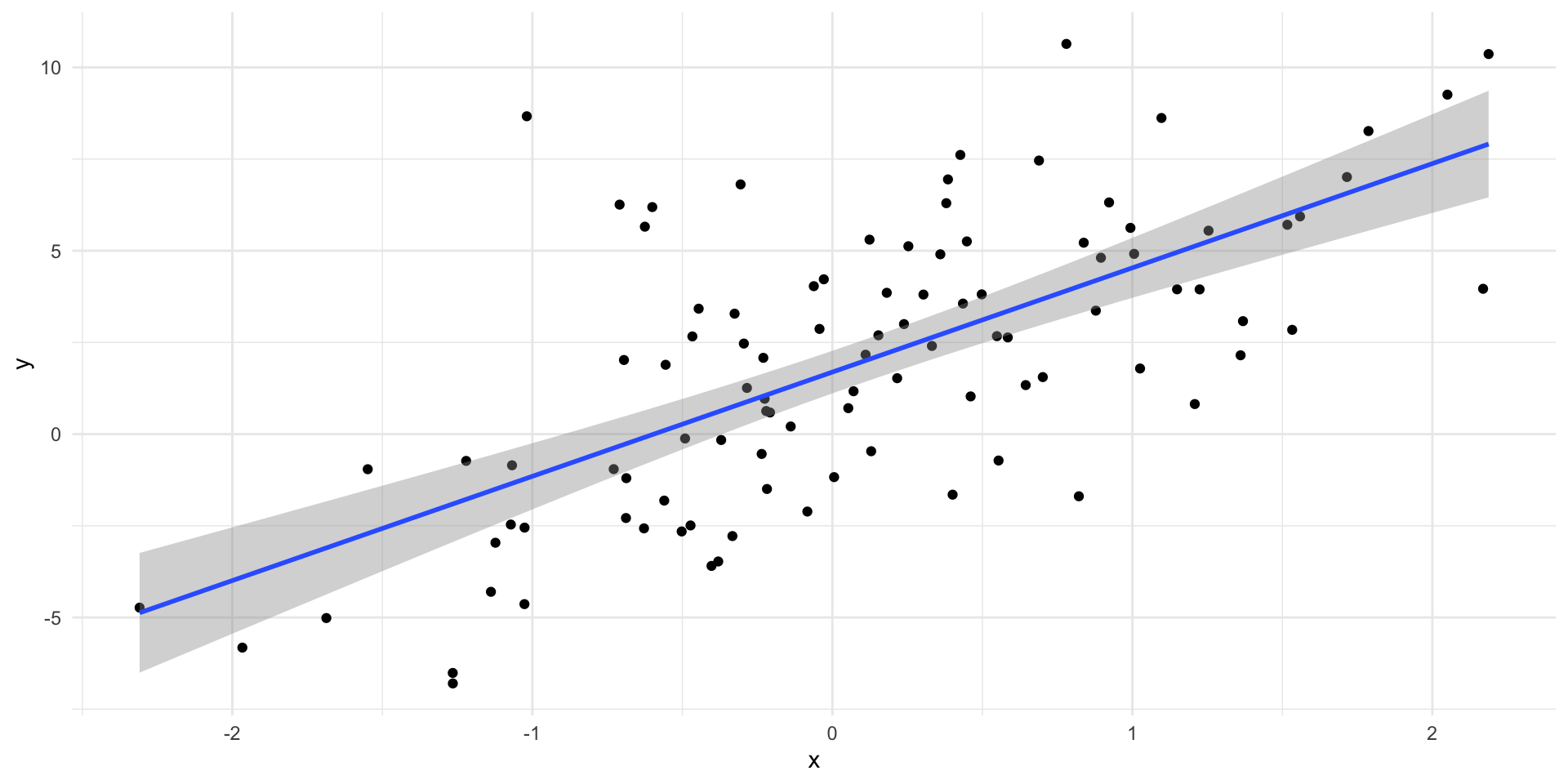
Example of Standard Errors
We usually leave the calculation to a computer. All that matters for us is knowing that we can read the output from a regression table in \(\textsf{R}\).
            Estimate Std. Error  t value     Pr(>|t|)
(Intercept) 1.691591  0.2926536 5.780182 8.868766e-08
x           2.842585  0.3206358 8.865463 3.497142e-14
Notice the second column. These are the standard errors for each of the (Intercept) and x; (or the variable name) estimators.
Computing Confidence Intervals
We can compute confidence intervals for the parameters using these standard errors if we wanted to, using the standard approach of treating these as statistics, and using qt(). But that takes work, and is manual …
Hypothesis Tests
We can perform hypothesis tests for these estimators, too. Typically, the one we are interested in for simple linear regression is:
\[ H_{0}: \beta_{1} = 0 \quad \text{vs.} \quad H_{1}: \beta_{1} \neq 0 \]
which corresponds to the cases of “no linear relationship” and “some linear relationship”.
Practically speaking, while we could manually compute and set up these tests… that isn’t really a good use of our time.
We can use the coefficient table from earlier and look at the fourth (far right) column, where the p-value for this test is found.
            Estimate Std. Error  t value     Pr(>|t|)
(Intercept) 1.691591  0.2926536 5.780182 8.868766e-08
x           2.842585  0.3206358 8.865463 3.497142e-14
How Good is the Model Fit?
There are three ways we assess how well the model fit (after ensuring the model fit in a way that made sense - that is, that the p-values are significant and the results aren’t silly).
- Residual Standard Error: estimate the Standard Deviation of \(\varepsilon\) in the original model formula.
- \(R^{2}\) statistic: proportion of variance explained
- Hypothesis F-test for overall model fit,
\[ \begin{align} H_{0}: &\ \beta_{1} = \beta_{2} = \ldots = \beta_{k} = 0 \\ & \quad \text{vs.} \\ H_{A}:&\ \text{at least one} \neq 0 \end{align} \]
How To Do? Use summary(), as above
Call:
lm(formula = y ~ x, data = firstsim)

Residuals:
    Min      1Q  Median      3Q     Max
-5.7220 -2.0505 -0.2625  1.7419  9.8712

Coefficients:
            Estimate Std. Error t value Pr(>|t|)
(Intercept)   1.6916     0.2927   5.780 8.87e-08 ***
x             2.8426     0.3206   8.865 3.50e-14 ***
---
Signif. codes:  0 '***' 0.001 '**' 0.01 '*' 0.05 '.' 0.1 ' ' 1

Residual standard error: 2.912 on 98 degrees of freedom
Multiple R-squared:  0.4451,    Adjusted R-squared:  0.4394
F-statistic:  78.6 on 1 and 98 DF,  p-value: 3.497e-14
Conclusion
Simple linear regression is … simple. The algorithm goes as follows, approximately:
- Ensure the relationship between \(Y\) and \(X\) is approximately linear - use a scatterplot
- Set up the data, and estimate \(\hat{\beta}_0\) and \(\hat{\beta}_1\) using
lm()in R. - Evaluate the estimate of \(\hat{\beta}_1\): what does it imply? Examine the fit graphically. Does everything make sense?
- Check the p-value, and by extension, evaluate the hypothesis test for \(\hat{\beta}_1\).
- Check the overall model fit using the three methods mentioned.
- Finish modelling … or possibly, start over! Modelling in The Real World is an iterative process, where multiple models are fit until you are happy with the overall performance.
An Example using the Advertising Data
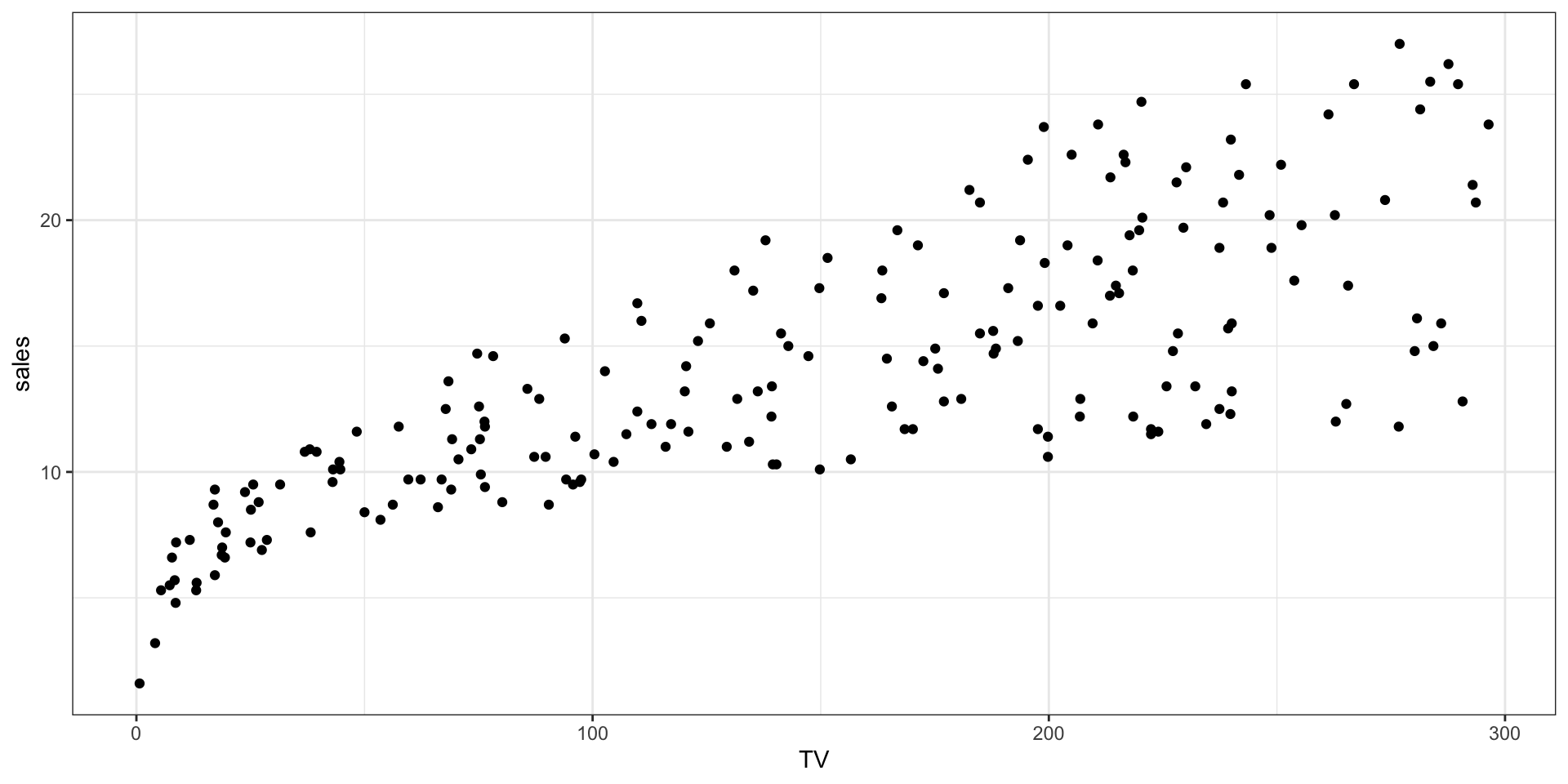
We will consider TV advertising spending as the predictor, and Sales as the response, from the Advertising example data set considered in the previous lab.
Continuing
The data look to have a fairly linear relationship overall, so it is plausible that using simple linear regression will give us something meaningful.
              Estimate  Std. Error  t value    Pr(>|t|)
(Intercept) 7.03259355 0.457842940 15.36028 1.40630e-35
TV          0.04753664 0.002690607 17.66763 1.46739e-42
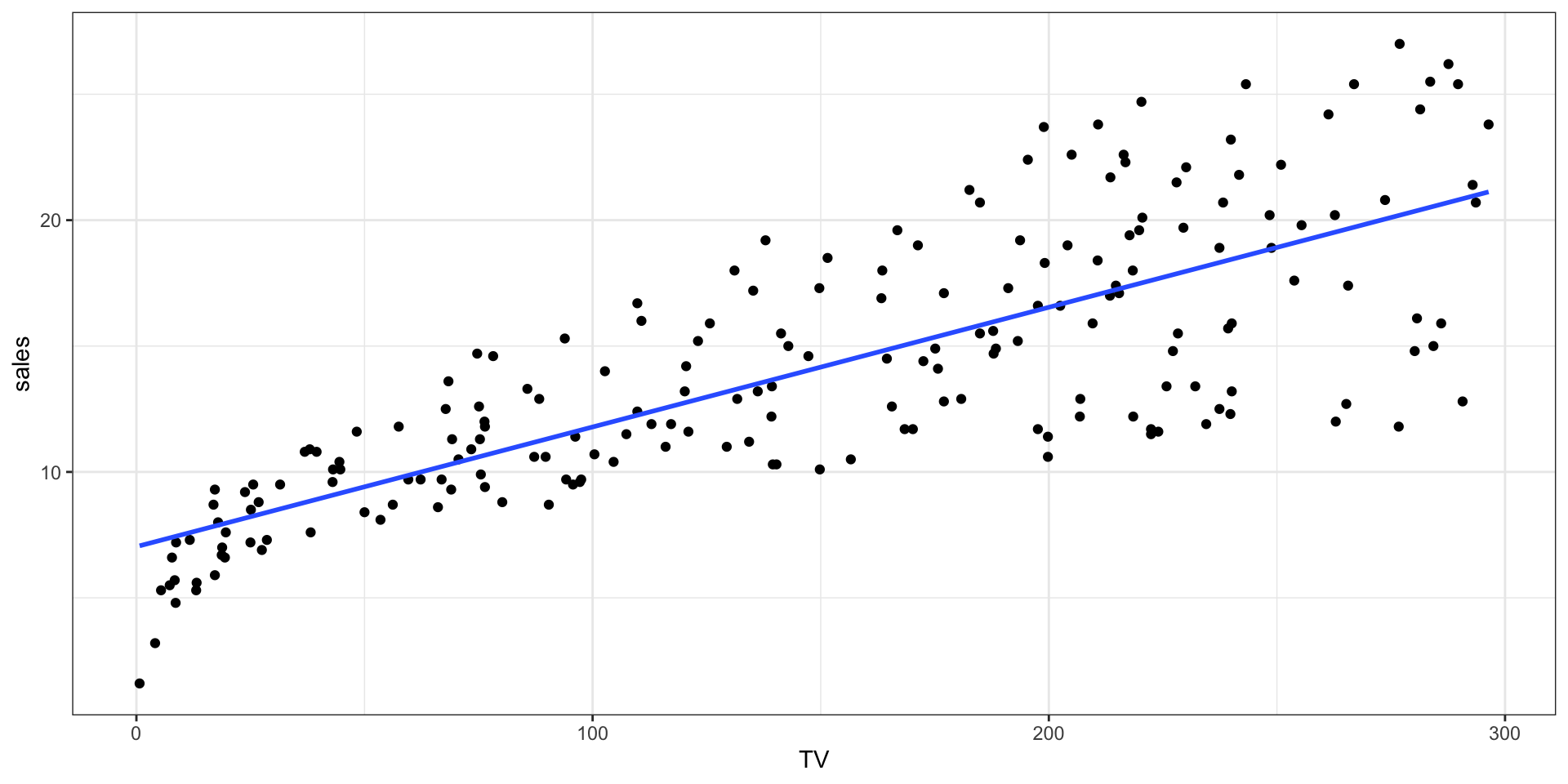
We have highly significant p-values, especially for the predictor TV, which is: the slope of the line. The estimate is fairly small, meaning a small slope, but the standard error is even smaller.
Continuing
Continuing
We have a significant p-value, the plot looks good, the slope makes sense. Let’s check the model accuracy metrics.
Call:
lm(formula = sales ~ TV, data = Advertising)

Residuals:
    Min      1Q  Median      3Q     Max
-8.3860 -1.9545 -0.1913  2.0671  7.2124

Coefficients:
            Estimate Std. Error t value Pr(>|t|)
(Intercept) 7.032594   0.457843   15.36   <2e-16 ***
TV          0.047537   0.002691   17.67   <2e-16 ***
---
Signif. codes:  0 '***' 0.001 '**' 0.01 '*' 0.05 '.' 0.1 ' ' 1

Residual standard error: 3.259 on 198 degrees of freedom
Multiple R-squared:  0.6119,    Adjusted R-squared:  0.6099
F-statistic: 312.1 on 1 and 198 DF,  p-value: < 2.2e-16
Continuing
There is a more involved check we can do, which involves looking specifically at the way the model fit interacts with the data:
- checking the residuals
- looking at the fit against the response
- looking at the fit against the predictor, etc.
You’ve likely seen these in a previous course, and we will discuss them in the coming weeks.
Example Conclusion
- We observe a statistical linear relationship between advertising budget on TV (in thousands of dollars), and overall sales (in thousands of units, for 200 different markets).
- An increase of $100 in TV advertising is associated with an increase in sales of 4.75 units (multiply the coefficient by 100 to get it in more sensible terms).
- Depending on what the “units” are, and how much they sell for, this might be a great benefit for the company!
- If you’re selling toothbrushes for $4.00, not a great trade; if you’re selling automobiles for $50,000, it’s amazing!
Multiple Linear Regression
Extending Linear Regression
- In practice, we usually have more than one predictor.
- We could run separate simple linear regressions, and try to then interpret each independently, but this isn’t entirely satisfactory.
- We don’t really know how to make a single prediction of the response given multiple models, and if there are any correlations across the predictors, they would be ignored.
- So, instead, we extend the simple linear regression model to multiple regression, giving each predictor a separate slope coefficient in a single model.
Notation
Suppose we have \(p\) distinct predictor variables, then the multiple linear regression model takes the form:
\[ Y = \beta_0 + \beta_1 X_1 + \dots + \beta_p X_p + \varepsilon, \]
where \(X_j\) represents the \(j\)th predictor, and \(\beta_j\) quantifies the association between that predictor and the response.
We interpret each coefficient \(\beta_j\) as the average effect on \(Y\) of a one-unit increase in \(X_j\), holding all other predictors fixed.
Least Squares Adaptation
The solution to the multiple linear regression problem is again done using Least Squares, but instead of being a line of best fit under minimum squared error, the solution becomes a higher-dimensional linear object (a plane, or a hyperplane) in a \(p + 1\) dimensional space.
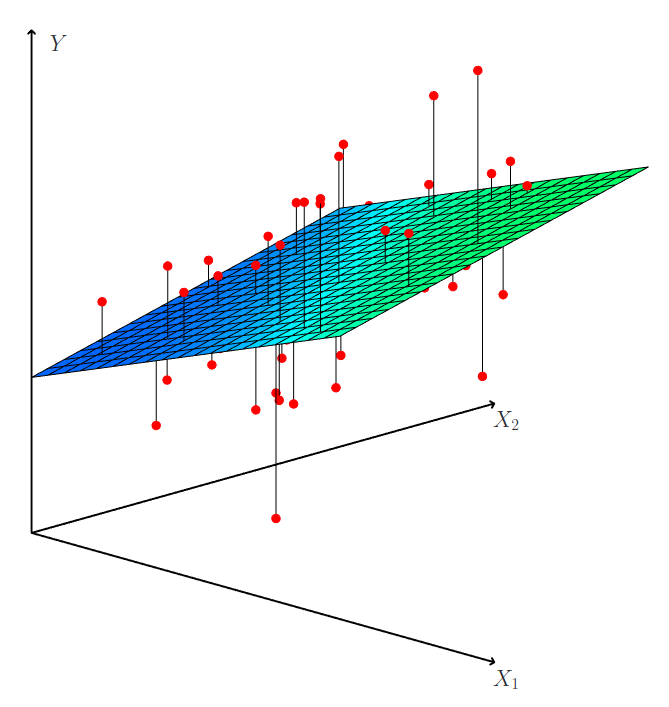
Figure 3.4 in ISLR2
Process
When we perform a multiple linear regression, there are some questions we are usually aiming to answer:
- Is at least one of the predictors \(X_1\) through \(X_p\) useful for predicting the response?
- Do all of the predictor help explain \(Y\), or only some?
- How well does the model fit the data?
- Given a set of predictor values, what is the predicted response, and how accurate is the prediction?
1. Is At Least One Useful?
In the multiple regression setting with \(p\) predictors, we need to ask whether all of the regression coefficients are zero, i.e., whether \(\beta_1 = \beta_2 = \dots = \beta_p = 0\). As in the simple linear regression setting, we use a hypothesis test to answer this question. We test the null hypothesis:
\[ H_0: \beta_1 = \beta_2 = \dots = \beta_p = 0 \] versus the alternative
\[ H_{A}: \text{at least one } \beta_{j} \neq 0. \]
This hypothesis test is performed by computing the F-statistic, which can be found in the bottom of the summary for lm().
2. Which Predictors Should be Used?
- It is possible that all of the predictors are associated with the response.
- However, it is more often the case that the response is only associated with a subset of the predictors.
- The task of determining which predictors are associated with the response, in order to fit a single model involving only those predictors, is referred to as variable selection.
2. Which Predictors Should be Used?
In Chapter 6 (a few weeks) we will examine some of the better ways we can select variables from a large set. For now, we will use only backwards selection.
Terminology
The textbook uses “Forward Selection”, “Backward Selection”, and “Mixed Selection”.
“Backward Selection” is usually referred to as “Backward Elimination”.
All three of these approaches are types of Stepwise Regression.
Backwards Selection
Algorithm:
- Start with all variables in the model
- Remove the variable with the largest p-value that is still larger than some cutoff (usually 0.05).
- Refit the new model, with \(p - 1\) predictors
- Repeat the removal until all remaining variables have a p-value below some threshold (again, usually 0.05).
3. Model Fit
Recall from earlier:
- For multiple regression, we can use an Adjusted \(R^{2}\) metric to determine the proportion of the variance of the response explained.
- This is most useful when comparing one model to another, say, when adding a predictor to your set: it helps determine what the improvement is through adding the new predictor.
- If a new predictor does not increase the Adjusted \(R^{2}\) (or even decreases it!), it wasn’t very useful, and may not actually need to be included.
4. Prediction, and Accuracy
Once we have a fit, predicting the response, \(Y\), on the basis of a set of predictors is simple - and in R, we can use the predict() function to do so.
There will be three sources of uncertainty:
- The reducible error - we have an estimate only, so there will be inaccuracy in it. Confidence intervals can give us a sense of closeness.
- Model bias - why would the true model be exactly linear? The model itself is an approximation.
- Irreducible error - we cannot know \(\varepsilon\), so no matter what, \(Y\) will vary from \(\hat{Y}\). Prediction intervals give us a sense of this question.
Continuing the Advertising Example
Let’s fit the advertising example, using all three kinds of advertising.
                Estimate  Std. Error    t value     Pr(>|t|)
(Intercept)  2.938889369 0.311908236  9.4222884 1.267295e-17
TV           0.045764645 0.001394897 32.8086244 1.509960e-81
radio        0.188530017 0.008611234 21.8934961 1.505339e-54
newspaper   -0.001037493 0.005871010 -0.1767146 8.599151e-01
Continued
In the previous slide, we see the multiple regression coefficient estimates when TV, radio, and newspaper advertising budgets are used to predict product sales using the Advertising data. We interpret these results as follows:
- For a given amount of radio and newspaper advertising, spending an additional $1,000 on TV advertising is associated with approximately 46 units of additional sales.
    Estimate   Std. Error      t value     Pr(>|t|)
4.576465e-02 1.394897e-03 3.280862e+01 1.509960e-81
Continued
- For a given amount of TV and newspaper advertising, spending an additional $1,000 on radio advertising is associated with approximately 189 units of additional sales.
    Estimate   Std. Error      t value     Pr(>|t|)
1.885300e-01 8.611234e-03 2.189350e+01 1.505339e-54 - For a given amount of TV and radio advertising, spending an additional $1,000 on newspaper advertising is associated with approximately 1 unit reduction in sales. (and the p-value is 0.86, which is indicative of an insignificant result)
    Estimate   Std. Error      t value     Pr(>|t|)
-0.001037493  0.005871010 -0.176714587  0.859915050
Correlation
Does it make sense for the multiple regression to suggest no relationship between sales and newspaper while the simple linear regression implies the opposite? In fact it does.
Consider the correlation matrix for the three predictor variables and response variable:
                  TV      radio  newspaper
TV        1.00000000 0.05480866 0.05664787
radio     0.05480866 1.00000000 0.35410375
newspaper 0.05664787 0.35410375 1.00000000
Notice that the correlation between radio and newspaper is 0.35.
Interpretation
- The correlation result indicates that markets with high newspaper advertising tend to also have high radio advertising.
\[ \text{newspaper } \uparrow \quad \Rightarrow \quad \text{radio } \uparrow \]
- Now suppose that the multiple regression is correct and newspaper advertising is not associated with sales, but radio advertising is associated with sales.
- Then in markets where we spend more on radio, our sales will tend to be higher, and as our correlation matrix shows, we also tend to spend more on newspaper advertising in those same markets.
Interpretation
Hence, in a simple linear regression which only examines sales versus newspaper, we will observe that higher values of newspaper tend to be associated with higher values of sales, even though newspaper advertising is not directly associated with sales.
So newspaper advertising is a surrogate for radio advertising; newspaper gets “credit” for the association between radio on sales.
Warning
When two predictors are highly correlated, we will begin to see issues when fitting the model. This is known as multicollinearity.
Other Considerations
Qualitative Predictors
- There is nothing that inherently prevents us from including qualitative variables in our models, provided we code them numerically.
- Recall that quantitative variables describe numbers (e.g. quantities), and qualitative variables describe characteristics (e.g. qualities).
- For example, we could include any binary status effect as a predictor: citizenship status (1 for
Citizen, 0 forNotCitizen); sex (1 forFemale, 0 forNotFemale); employment status (1 forEmployed, 0 forUnemployed), and so on. - These can be highly useful variables for subdividing data sets into regions that have different characteristics.
Dummy Variables (Two Levels)
If a qualitative predictor (also known as a factor) only has two levels (categories) or possible values, then incorporating it into a regression model is very simple: we create an indicator (or “dummy”) variable that takes on two possible numerical values.
This dummy variable is then included as per usual, replacing the original variable.
Example using Advertising
Imagine that the markets that provide the data for the Advertising data also could have classification as Urban or Rural. How might this modify the results in terms of spending budgets?
              Estimate  Std. Error    t value     Pr(>|t|)
(Intercept) 6.85436420 0.525156071 13.0520517 1.829642e-28
TV          0.04770608 0.002705104 17.6355788 2.165366e-42
Type        0.32276638 0.463906929  0.6957568 4.874011e-01
Example Continued
              Estimate  Std. Error    t value     Pr(>|t|)
(Intercept) 6.85436420 0.525156071 13.0520517 1.829642e-28
TV          0.04770608 0.002705104 17.6355788 2.165366e-42
Type        0.32276638 0.463906929  0.6957568 4.874011e-01
How do we interpret this? We have an additional variable now, called Type, which is made up! But we can pretend it is the Urban/Rural tracking we said it was. Then when Type = 1, the market is Urban; when Type = 0, the market is Rural. And the coefficient was 0.3227664.
Interpretation: When the market is Urban (Type = 1), on average sales are 0.32 units higher than when the market is Rural (and Type = 0). There are interesting things we can do with these factor variables and we’ll see more of this soon!
Multiple Levels (Factor Variables)
- When a qualitative predictor has more than two levels, a single dummy variable cannot represent all possible values.
- In this situation, we can create additional dummy variables: one for each level of the variable.
- However, it turns out that R’s code is smarter than that, and can “just do it”.
R is Smart
R will automatically create the necessary dummy variables for you as long as the categories are strings ("blue", "red", "green", … ).
If the categories are numeric, as in the case for a Likert scale (1, 2, 3, 4, 5), then you will need to convert them to factors.
It is a good idea to always convert your categorical variables to factors.
Example of Multiple Levels
               Estimate  Std. Error    t value     Pr(>|t|)
(Intercept)  6.88436527 0.571611577 12.0437821 2.304523e-25
TV           0.04813654 0.002728304 17.6433945 2.432002e-42
TypeRural    0.59730497 0.579806893  1.0301791 3.041955e-01
TypeTown -0.32008492 0.544216168 -0.5881577 5.571035e-01- Notice how we see TypeRural and TypeTown, but not TypeCity?
- There is a rule for multiple levels called identifiability: we can only estimate n - 1 levels worth of coefficients identifiably; the other gets absorbed into the intercept term.
Multi-Level Factors
We will discuss factors more in detail in the coming weeks, especially as we discuss the use of ANOVA and related methods.
One level is defined as the Baseline level (or reference level) - this will be absorbed into the (Intercept) term. So in the previous example, where the estimates were
(Intercept)          TV   TypeRural    TypeTown
 6.88436527  0.04813654  0.59730497 -0.32008492
we have baseline sales of 6.88 units, with Rural being associated with an increase of 0.6 units, and Town being associated with a decrease of -0.32 units, relative to City.
Assumptions of Linear Models
The two primary assumptions of linear models are that the relationship between the predictors and response are both additive and linear.
The additivity assumption says that the association between a given predictor and the response does not depend on the values of the other predictors. This can be relaxed somewhat.
Fitting a Model vs. Inference
You can fit a linear model to any data set. The conditions of additivity and linearity are not necessary for fitting a model.
However, if you want to make inferences about the model, then these assumptions are necessary, along with constant variance of the residuals and some kind of distributional assumption for the residuals (often the normal distribution is assumed).
Interaction Terms
- In the Advertising data example, we concluded that both TV and radio seem to be associated with sales.
- The linear models that formed the basis for this conclusion assumed that the effect on sales of increasing one advertising medium is independent of the amount spent on the other media.
- However, this simple model may be incorrect.
- Suppose that spending money on radio advertising actually increases the effectiveness of TV advertising, so that the slope term for TV should increase as radio increases.
- In this situation, given a fixed budget of $100,000, spending half on radio and half on TV may increase sales more than allocating the entire amount to either TV or to radio.
- In marketing, this is known as a synergy effect, and in statistics it is referred to as an interaction effect.
The Model for Interaction
Consider the standard linear regression model with two variables,
\[ Y = \beta_0 + \beta_1 X_1 + \beta_2 X_2 + \varepsilon. \]
- In this model, a one-unit increase in \(X_{1}\) is associated with an average increase in \(Y\) of \(\beta_{1}\) units: the value of \(X_{2}\) does not alter this statement.
- We can modify this by including an interaction term, constructed by computing the product \(X_{1}X_{2}\). This gives:
\[ Y = \beta_0 + \beta_1 X_1 + \beta_2 X_2 + \beta_3 X_1 X_2 + \varepsilon. \]
Back to the Advertising Example Again
               Estimate   Std. Error   t value     Pr(>|t|)
(Intercept) 6.750220203 0.2478713699 27.232755 1.541461e-68
TV          0.019101074 0.0015041455 12.698953 2.363605e-27
radio       0.028860340 0.0089052729  3.240815 1.400461e-03
TV:radio 0.001086495 0.0000524204 20.726564 2.757681e-51- You treat an interaction term like any other for determining if it belongs.
- In this case, the highly significant \(p\)-value means that we should include this term in our model.
- We interpret the coefficient as the “increase in TV advertising effectiveness” associated with a one-unit increase in radio advertising.
Compare the Two Models
One of the points of the metrics we discussed earlier was comparing two models. Let’s compare the two models using \(R^{2}\):
- \(R^{2}\) for no interaction model: 0.8971943
- \(R^{2}\) for interaction model: 0.9677905
- So a nice improvement: we have explained an additional 6.9% of the variability in the sales by including this interaction (from 89.7 up to 96.8).
- The coefficient suggests that an increase in TV advertising of $1,000 is associated with increases sales of (\(\beta_{1} + \beta_{3} \times \texttt{radio}) \times 1,000\) units, or 19 + 1.1
radiounits.
Notes on Using Interactions
- It can sometimes be the case that an interaction term has a very small \(p\)-value, but the associated main effects (in this case, TV and radio) do not.
- The hierarchical principle states that if we include an interaction in a model, we should also include the main effects, even if the p-values associated with their coefficients are not significant.
Problems with Models
Beyond the Scope
- There are a large number of problems that can occur when trying to fit linear models (of which multiple linear regression are a type).
- Detecting these, and correcting those that can be corrected, are beyond the scope of this course: we’re hoping to look big picture, versus diving completely into the weeds on each model.
- If you are interested in an overview of some of the things that can be done, please read Chapter 3.3.3 in the textbook.
Conclusion
Next Topic
- Our first major topic will be an extension of linear models into the world of non-equal relationships, replacing the left-hand side in the regression equations with something slightly more complicated.
- You have probably seen logistic regression before, and that is the simplest example of such relationships.
Readings
- The material of this week is Chapter 3 of ISLR, sections 3.1-3.3.3.
- Next week, we will continue into Chapter 4, and discuss Classification. Readings are Chapter 4 of ISLR, sections 4.1-4.6 inclusive.